
Ten reasons, one office
10 Reasons to Use CA Office Management Software, and Why CA Firms Choose Turia
Choosing how to run your office is one of the bigger decisions a Chartered Accountant firm makes. As the practice grows, clients, documents, deadlines, staff assignments, notices, invoices and client messages all get harder to keep track of.
Most firms patch it together with Excel, WhatsApp, Google Drive, email and a few separate apps. Each tool does its job, but the work between them falls on your team.
The short answer
CA office management software replaces that patchwork with one system for clients, compliance, documents, staff and billing.
Turia is CA office management and automation software that brings together client management, compliance tracking, documents, WhatsApp, notices, billing, staff management and AI-powered workflows. Here are ten reasons a CA office is better run on software like it.
Excel for clients, WhatsApp for requests, Drive for files…
1. Manage Your Entire CA Practice from One Platform
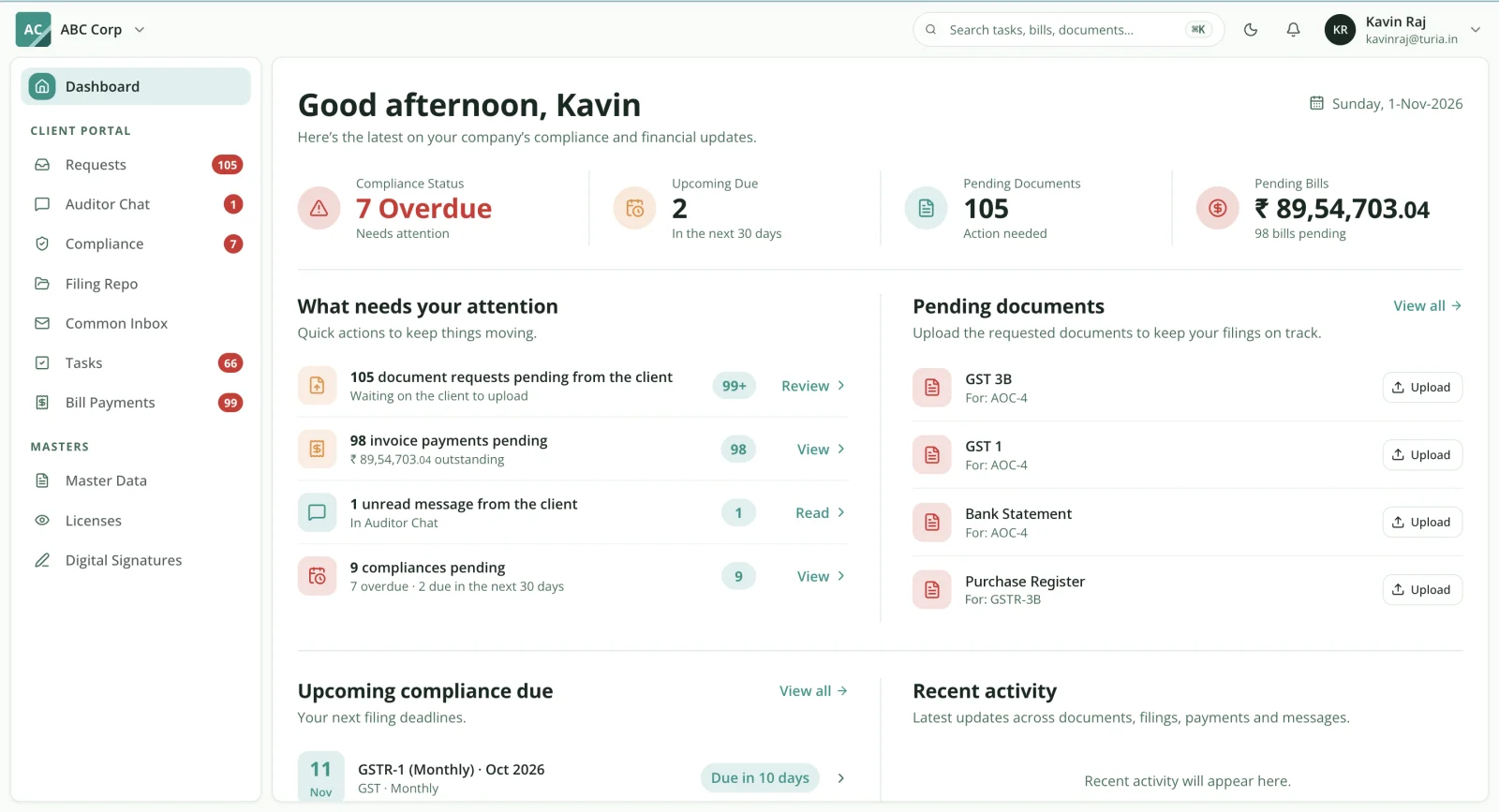
A CA office needs more than a task app. It needs one connected system for clients, staff, assignments, compliance, documents and billing. That is what good CA office management software gives you.
Turia covers the whole office in dedicated modules:
- Leads and onboarding
- Client Master
- Proposals
- Recurring tasks
- GST, TDS and Income Tax
- Document inward/outward
- Client Portal
- WhatsApp and email
- Notices
- Billing
- Attendance and timesheets
- DSC and licence registers
- Reports and analytics
Why it mattersPartners get one view of the firm's operations, and employees share one system for their assignments.
Documents arrive in a dozen different chats.
2. Give Every Client a Dedicated Digital Portal
Document exchange is one of the most time-consuming jobs in a CA office. Clients send files on WhatsApp and email; employees download, sort and send work back. With hundreds of clients, that breaks down.
Turia's Client Portal gives each client their own login to upload documents, download shared files and see what the firm needs from them. See what a CA client portal should offer.
Why it mattersClients get a more professional digital experience, and your office stops depending on scattered attachments and individual chats.
“Has the client sent the bank statement yet?”
3. Automate Client Document Collection Through WhatsApp and AI Agents
How many hours does your team spend asking clients for pending documents? Bank statements, purchase invoices and sales records often take several reminders each.
Turia's Document Collection Agent sends the request on WhatsApp Business or email when a task is created. It follows up while documents are pending and shows the team where collection stands. When a recurring GST assignment is generated, no one has to send the first message. See how the agent works, and how WhatsApp documents reach the right task.
Why it mattersEmployees spend less time chasing clients and more time preparing returns, reviewing work and serving clients.
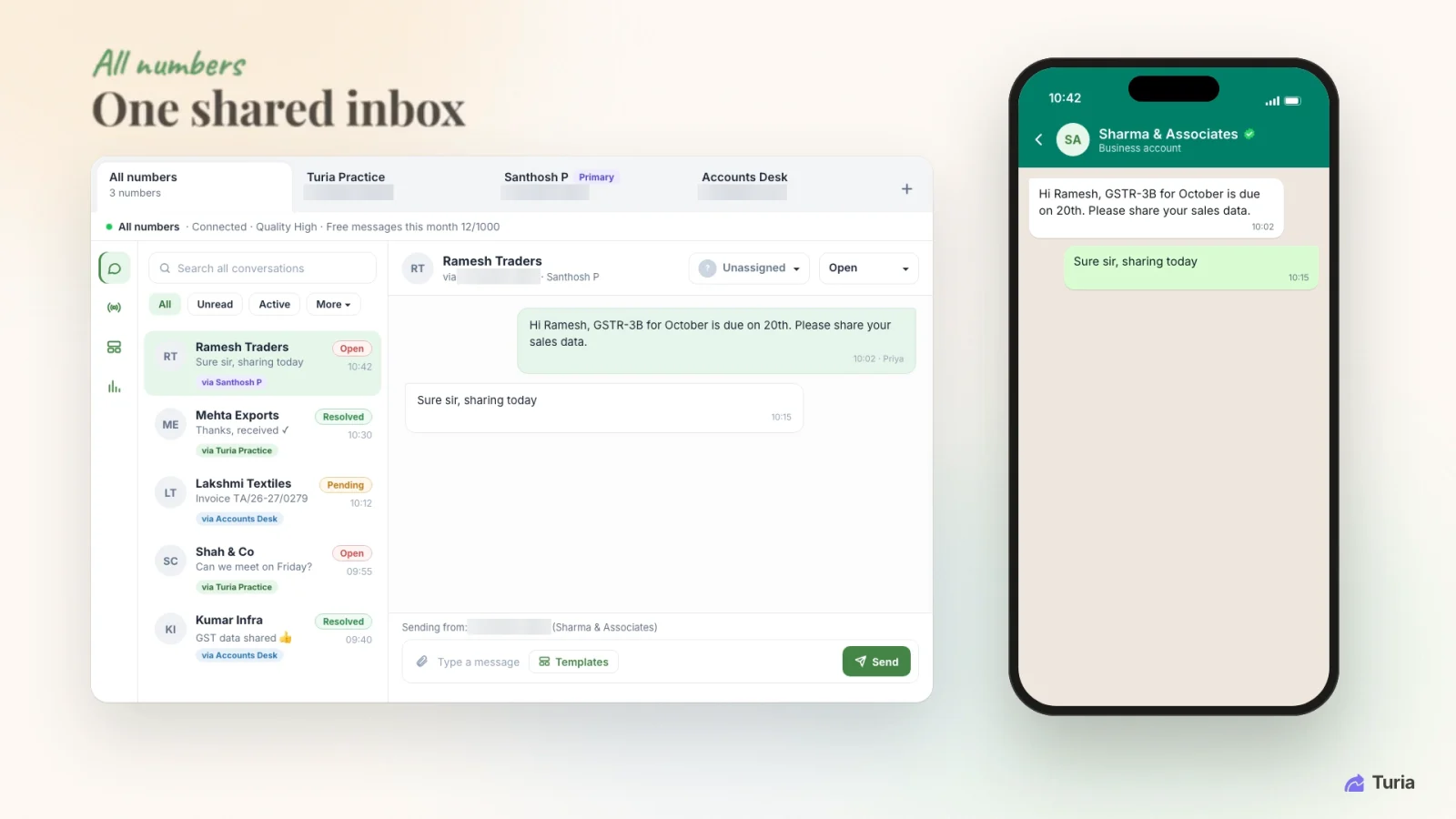
Every WhatsApp chat in one shared inbox, with a status and an owner. Phone numbers are masked. The same 400 GST tasks, typed in again every month.
4. Automatically Generate and Track Recurring Compliance Tasks
A CA office runs hundreds of recurring statutory assignments across clients and periods.
In Turia you configure monthly GST, quarterly TDS, annual Income Tax, MCA/ROC and other recurring work once. Tasks are then generated on schedule, each with an owner, due date, checklist and status. Filing status syncs back from the portals into the compliance tracker.
Why it mattersYour team stops recreating the same assignments every month, and deadlines no longer live only in spreadsheets.
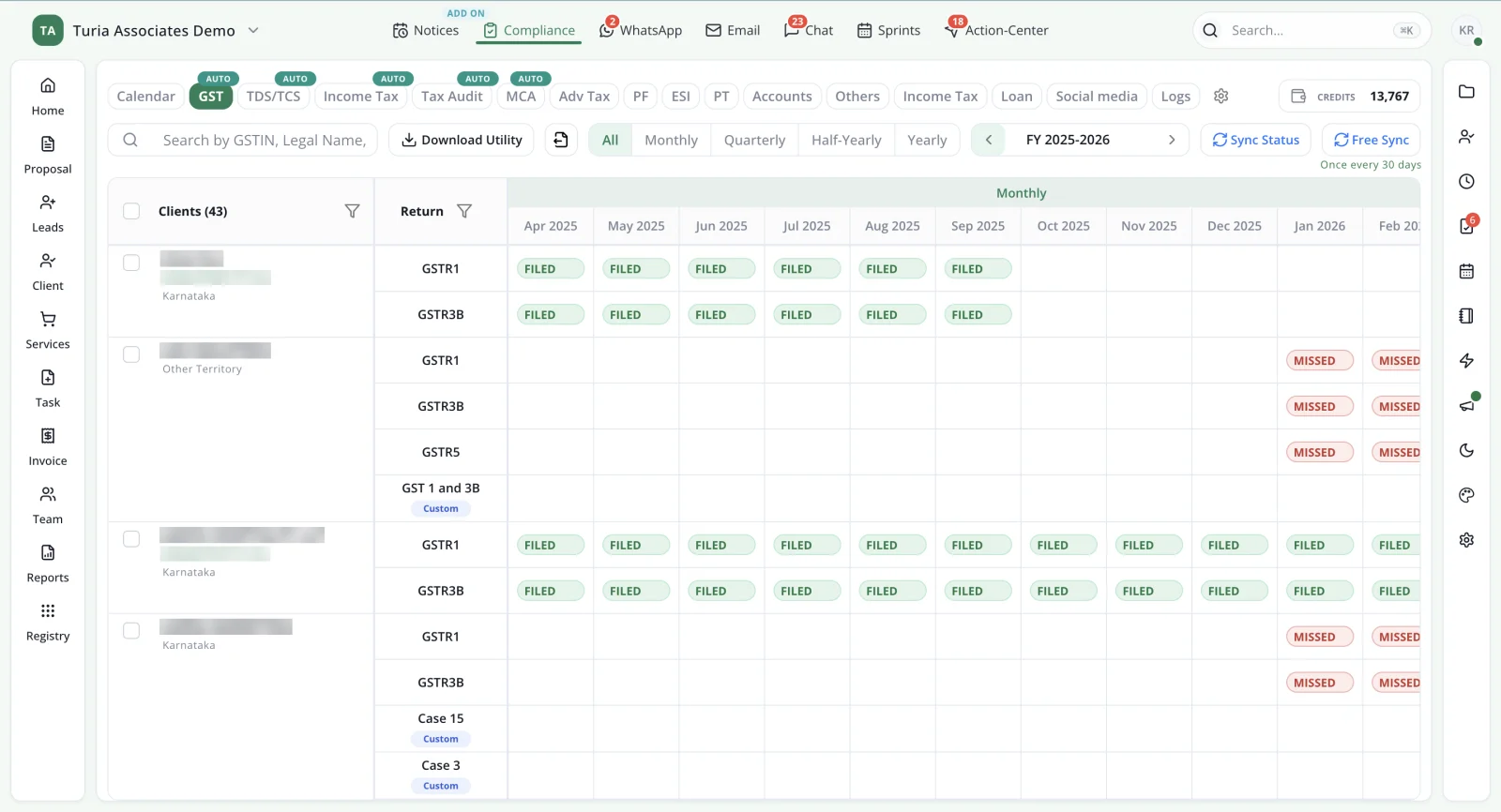
Recurring GST work across the client base, Filed or Missed at a glance. Client names and GSTINs are masked. Someone has to log in to three portals to look for notices.
5. Manage GST, Income Tax and TRACES Notices in One Place
Notices create real pressure in a CA office. Someone has to spot them, tie them to the client, assign them and get a reply in on time.
Turia's paid Notice Management add-on fetches supported notices from the GST, Income Tax and TRACES portals. Each notice gets a client, an owner and a deadline, and is tracked until it is resolved.
Why it mattersPartners see every notice that needs attention, so important follow-ups are far less likely to slip.
Filed returns sit in an employee's downloads folder.
6. Use AI Agents to Automate Final Document Delivery and Payment Follow-ups
Automation should not stop once documents are collected. The office also delivers finished work, sends invoices and chases payments.
Turia's Final Document Agent sends completed documents to the client when the filing reaches its completion trigger. The Invoice & Collection Agent sends invoices and payment reminders. The Payment Acknowledgement Agent confirms payments when they arrive. Turia's AI agents come at no extra cost.
Why it mattersEmployees spend less time on routine messages, and clients get consistent updates from engagement to payment.
“Who is working on what?” asked out loud, every day.
7. Monitor Employee Productivity, Attendance and Timesheets
Partners need to see how work is spread across the team. Without tracking, overloaded employees, pending assignments and time spent per client stay invisible.
Turia brings attendance and leave, timesheets, task allocation and practice reporting into the same office system as the work.
Why it mattersWith workload visible, partners can spread work more evenly and understand how productive the team really is.
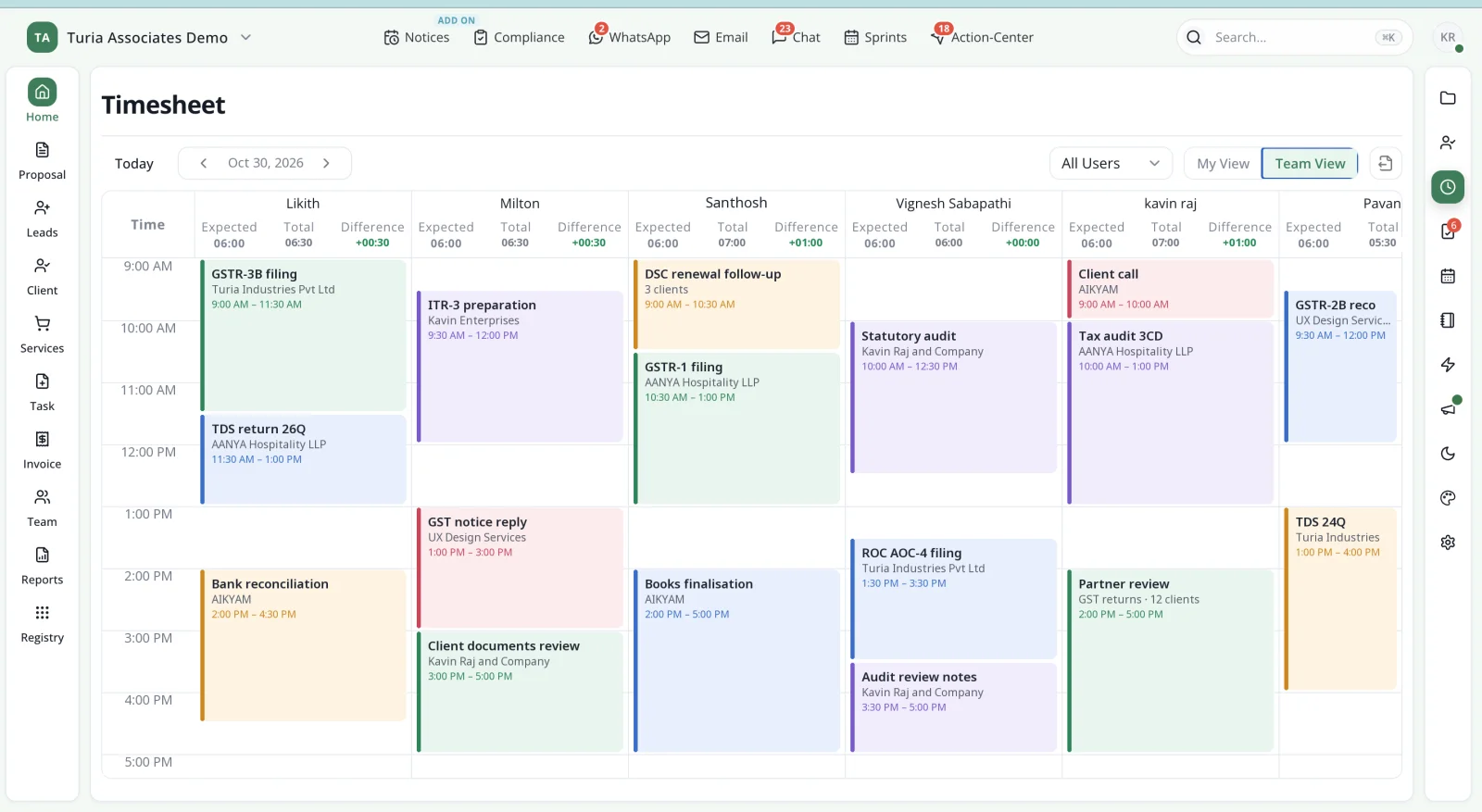
The whole office's day in one view, logged against clients and assignments. Outstanding fees tracked in a separate spreadsheet.
8. Manage Billing, Invoices and Collections Alongside Client Work
A CA office should track its revenue as carefully as its compliance.
Turia's billing and invoicing covers proforma and final invoices, billable time, expenses, payments and outstanding dues, with reminders. Because it sits next to the client work, partners see which clients need a follow-up.
Why it mattersBilling and collections stay visible without a second set of records to maintain.
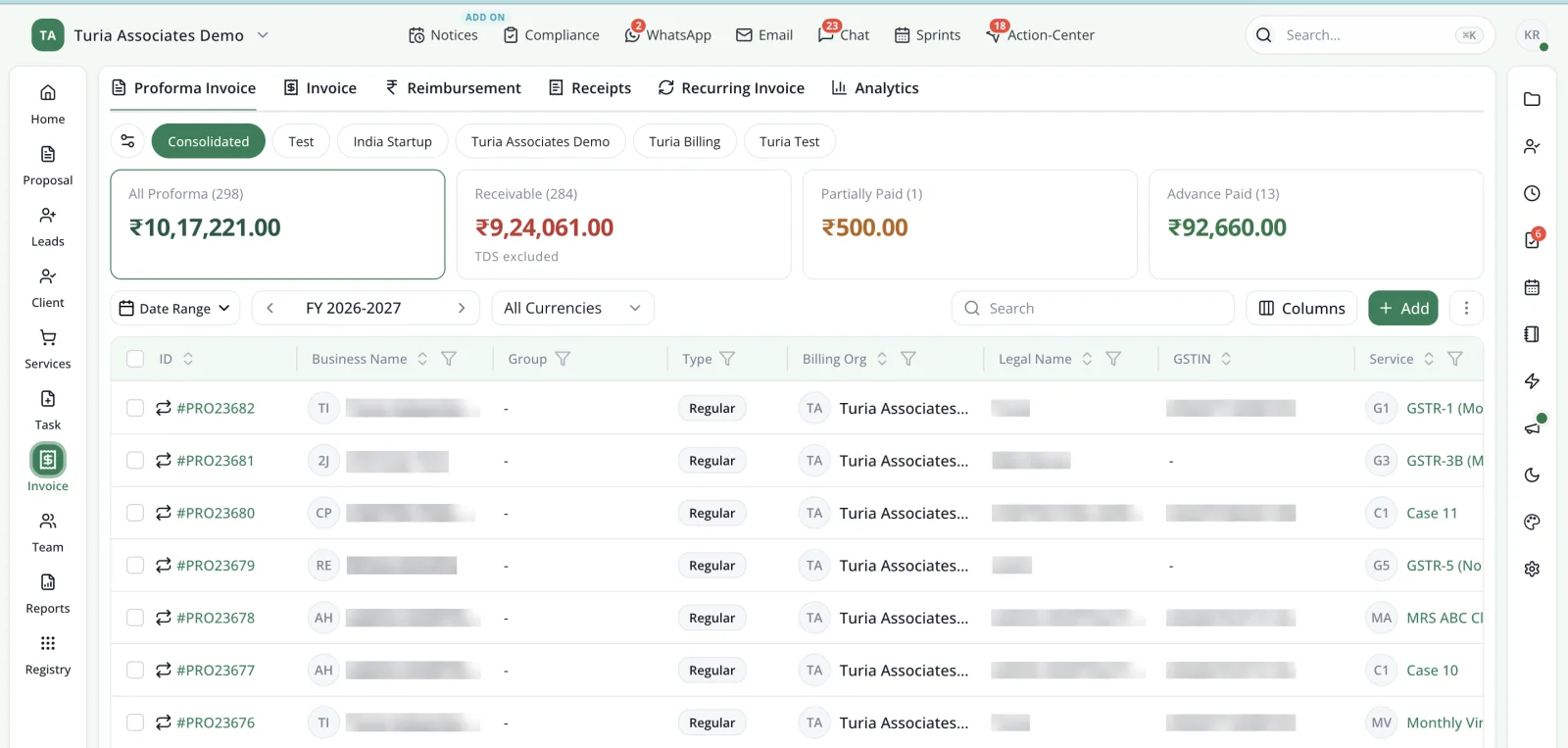
Invoices and receivables next to the work they bill for. Client names and GSTINs are masked. The branch office runs on its own spreadsheets.
9. Access Your CA Practice from Multiple Offices
Many CA firms run more than one branch, or have staff working from different places. Separate spreadsheets and local files make that hard to coordinate.
Turia is cloud-based, so authorised partners and employees reach the same workspace from any office. Client information, assignments, compliance and staff activity stay in one place. See how to run a multi-location CA firm.
Why it mattersPartners can follow the whole practice without being in every office.
Another app, another bill, for every new problem.
10. Get a Scalable Practice Management System with Affordable Pricing
Office software should grow with the firm without making costs hard to manage.
Turia's annual plans are priced by number of users, never by clients. They run from ₹6,999 for up to 5 users to ₹34,999 for up to 60, excluding 18% GST. Every plan has the same features, and there is a 7-day free trial. Notice Management, extra Client Portal storage and WhatsApp provider charges are separate. See every plan on the pricing page.
Why it mattersPick the plan that fits your team today, and move up as the firm grows.
Beyond the list
How Is Turia Different from Using Multiple Software Applications?
Picture an office with Excel for clients, WhatsApp for communication, Google Drive for documents, one app for attendance and another for billing. Each solves its own problem, yet employees still carry information between them.
Turia connects these activities around the same client, assignment and employee. The benefit is not the number of features; it is that the office's information is connected. We follow one client through that connected system in which software can handle all the operations of a CA firm.
The benefit is not simply the number of features. It is connecting the work around the same client, assignment and employee.
Before you choose
What Can Turia Automate Automatically?
Before choosing any CA office management software, find out which workflows run on their own and which need your team.
Runs on its own once configured: recurring task generation, compliance reminders, and WhatsApp and email reminders. Supported notices are fetched through the paid add-on. AI agents handle document requests and follow-ups, final document delivery, invoice follow-ups and payment acknowledgements.
Supported, with your team in the loop: WhatsApp-to-task and email-to-task conversion, and filing status sync from the portals.
Still needs professionals: preparing and reviewing returns, notice replies, and authorised filing. Whether a task closes itself after filing depends on the integration.
The full activity-by-activity breakdown is in what CA practice automation software automates, and what still needs people.
500+ CA firms use Turia Practice every day












Turia has become an essential part of our firm's daily operations. Features like task assignment, compliance reminders, document management, and client tracking have saved us a lot of time.
— Nafeez Khan, Chartered Accountants
More from firms on our testimonials page.
Is it a fit?
Who Should Choose Turia?
Turia suits CA and CS firms that want an organised office and less repetitive admin. It is worth evaluating if you have 5–50 employees and hundreds or thousands of clients. It suits firms that run recurring GST, TDS and Income Tax work and rely on WhatsApp for client communication.
It fits especially well if you also want a client portal, notice monitoring, attendance and timesheets, billing in the same system, or AI-powered follow-ups. Running a team of 5–10? See which software a small CA firm should use.
If you only need standalone accounting or tax-return preparation software, Turia is not that. Its focus is running the CA office and automating its operations.
Questions firms ask
Frequently Asked Questions About CA Office Management Software
What is CA office management software?
CA office management software runs the operations of a Chartered Accountant's office: clients, recurring compliance work, staff assignments, documents, client communication, notices and billing. It manages the firm itself, not the client's books.
What are the benefits of CA office management software?
It puts clients, work, documents and billing in one system and gives clients a portal. It automates document collection, recurring tasks and follow-ups. It also tracks notices, shows staff workload and keeps collections visible. The ten reasons in this guide cover each benefit.
Is CA office management software the same as practice management software?
Mostly, yes. Both terms describe software that runs a CA firm's operations. 'Office management' stresses the day-to-day running of the office, such as staff, documents and follow-ups. 'Practice management' covers the same ground plus client acquisition and reporting. Turia does both.
How is office management software different from accounting software?
Accounting software keeps a client's books. CA office management software runs the firm: who is doing which client's work, by when, with which documents, and whether it has been billed. Most firms use both side by side.
Which is the best CA office management software in India?
The best fit depends on team size and how much you want automated. Turia suits firms that want clients, compliance, WhatsApp, notices, staff and billing in one system, with AI agents for document collection and follow-ups. Compare options in our top 10 practice management software guide.
Does Turia offer a free trial?
Yes. Turia offers a 7-day free trial, so firms can try it with their own clients and team before subscribing.
Ten reasons. One calmer office.
Build a More Organised and Automated CA Practice with Turia
Choosing office software is not about finding an app to hold client records or track tasks. It is about a system that runs the firm's whole operational lifecycle.
From onboarding and document collection to compliance, notices, staff productivity and billing, Turia connects the major functions of a CA office in one platform. Its AI agents also take on document collection, final document delivery and payment follow-ups.
If you want less time coordinating routine work and more time growing your practice, Turia is worth considering.
Website · Features · Pricing · CA Office Management Software
Further reading