One front door for every client

Which CA Practice Management Software Offers Client Login, Document Upload and Download?

You want every client to have their own login: somewhere they upload what you ask for, download filed returns and talk to your team. Not another WhatsApp thread, email chain or shared Drive folder.

Where are your clients' documents right now? → In 60 seconds: from WhatsApp, inbox and Drive to your own branded portal, with folders, secure chat, tasks, due dates and invoices on web and mobile. Demo data.

Chapter 1 · The direct answer

Which CA Software Offers Client Login and Document Upload?

If you want every client to have a separate login to exchange documents with your team, consider Turia and its Client Portal.

Turia manages client information, internal documents, tasks, compliance and communication in one platform. Its Client Portal extends that to the client: a dedicated place to work with the firm and exchange documents. Firms move away from WhatsApp messages, email attachments and scattered Drive folders, towards one organised document workflow. The goal:

  1. A separate login for every client
  2. Clients upload what the firm asks for
  3. The firm shares completed documents
  4. Documents organised around client records
  5. Fewer follow-ups about missing files
  6. Clear view of what's collected and delivered

For a firm with hundreds of clients, that makes document exchange far more organised. More on the portal itself on our client portal for CA firms page.

Chapter 2 · Where documents go missing

The Problem: Why CA Firms Need a Separate Client Portal

Take a firm with five employees, 300 GST clients and 100 Income Tax clients. Every month it collects bank statements, sales and purchase data, invoices, expense details and other records. Today, that often looks like this:

  1. An employee asks for documents on WhatsApp.

  2. The client sends some on WhatsApp.

  3. Others arrive by email.

  4. A few come through Google Drive.

  5. The employee downloads and saves them locally.

  6. Someone works out the right client and financial year.

  7. The CA files and shares the completed documents.

  8. Months later, the client asks for them again.

Scattered across channels

The team searches WhatsApp chats, email threads and shared folders for one client's files.

No document history

No one is sure which documents arrived, which are pending and which were already delivered.

The same copies, again

Clients keep asking for filed returns, acknowledgements and reports the firm already sent.

Admin instead of accounting

Staff spend hours downloading, renaming, sorting and forwarding files.

A dedicated client portal fixes much of this by giving the firm and its clients one organised place to meet.

Chapter 3 · What a CA portal must do

What Should an Ideal CA Client Portal Offer?

Not every file-sharing tool suits a CA firm. A proper client portal has to fit how accounting and compliance practices actually work. These are the essentials.

3.1Separate login for every client

Each client has an individual account and sees only their own documents and information, never another client's.

3.2Client document upload

Clients upload documents straight to the portal.

  • Bank statements
  • Sales and purchase invoices
  • Expense bills
  • GST documents
  • TDS certificates
  • Income Tax supporting documents
  • Financial statements

3.3Document download

Clients download what the firm shares with them.

  • Filed GST returns
  • ITR acknowledgements
  • Financial statements
  • Tax audit reports
  • Computation sheets
  • Certificates

3.4Client-wise organisation

Documents sit with the right client, in a consistent structure, so no one digs through hundreds of unrelated files.

3.5Inward and outward tracking

The firm can see what came in, what went out, what is still awaited and what has been delivered.

3.6Communication and follow-ups

WhatsApp and email stay important because clients will not log in every day. Requests and reminders should still reach them there.

3.7Connected to practice management

The portal should link to the firm's client database, tasks, compliance calendar and internal documents, not stand alone.

For inward and outward tracking, the firm needs four states visible at a glance:

Inward

Documents received from clients

Outward

Documents shared with clients

Pending

Documents still awaited

Completed

Documents delivered to clients

Chapter 4 · Inside Turia's Client Portal

How Turia Solves These Requirements

Turia pairs practice management with a client portal. Your client sees nine screens:

  1. Brand
  2. Dashboard
  3. Requests
  4. Auditor Chat
  5. Compliance
  6. Filing Repo
  7. Tasks
  8. Bill Payments
  9. Masters
All nine screens in under two minutes: brand, dashboard, requests, chat, compliance, Filing Repo, tasks, bills and masters. Demo data throughout.

Here is how they meet each requirement.

  1. Your brand

    The client opens your portal, not a software vendor's.

    4.1Dedicated Client Access

    Turia's client portal for CA firms gives every client one digital front door to the firm. It is white-labelled with the firm's logo, colours and domain, and the same portal runs in a mobile app on the client's phone.

    Instead of searching old WhatsApp chats or email threads, clients go to the portal. With hundreds of clients, that gives the firm one structured way to work with all of them.
  2. Upload & download

    “Your CA asks for documents. You upload right there.”

    4.2Document Upload and Download

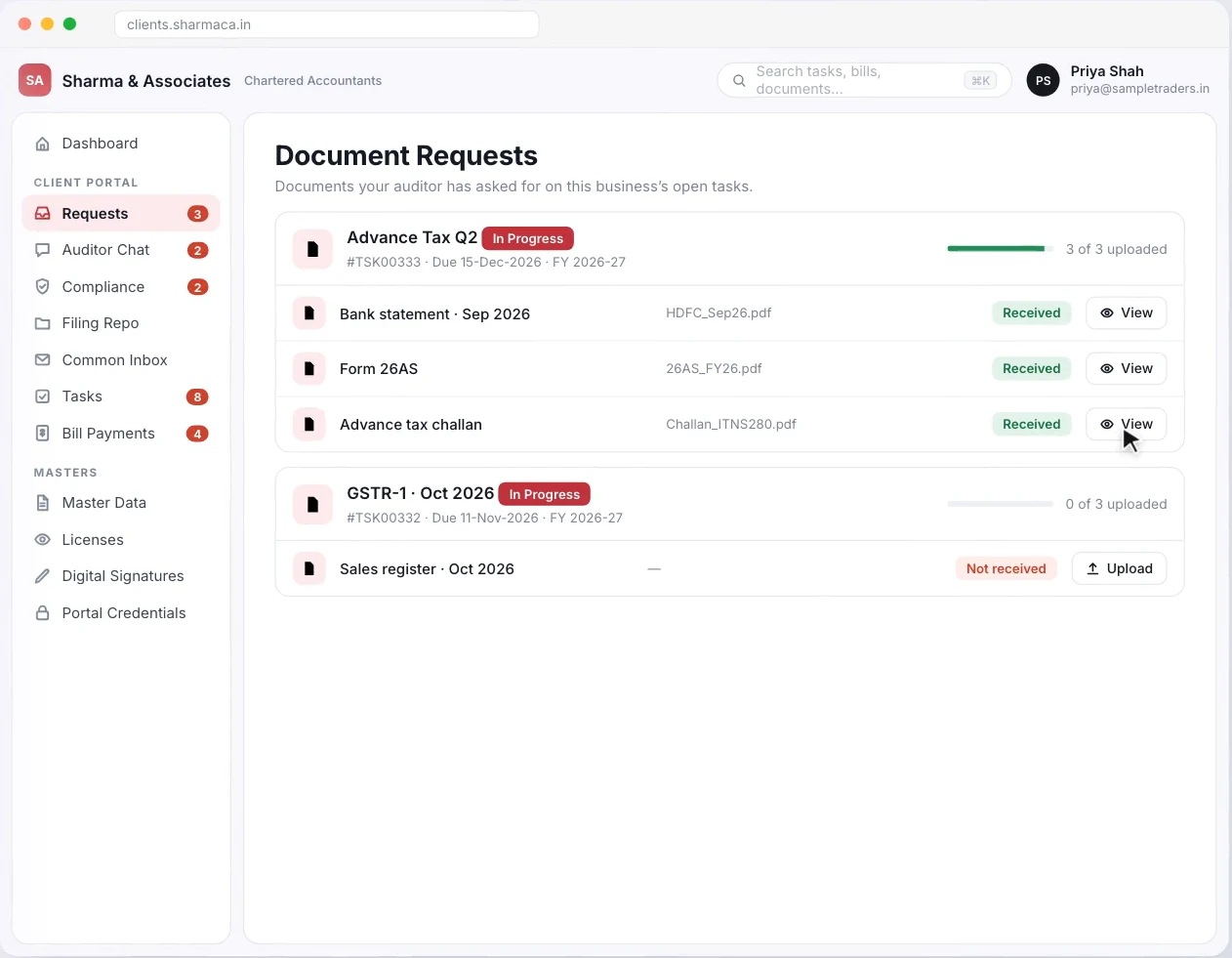
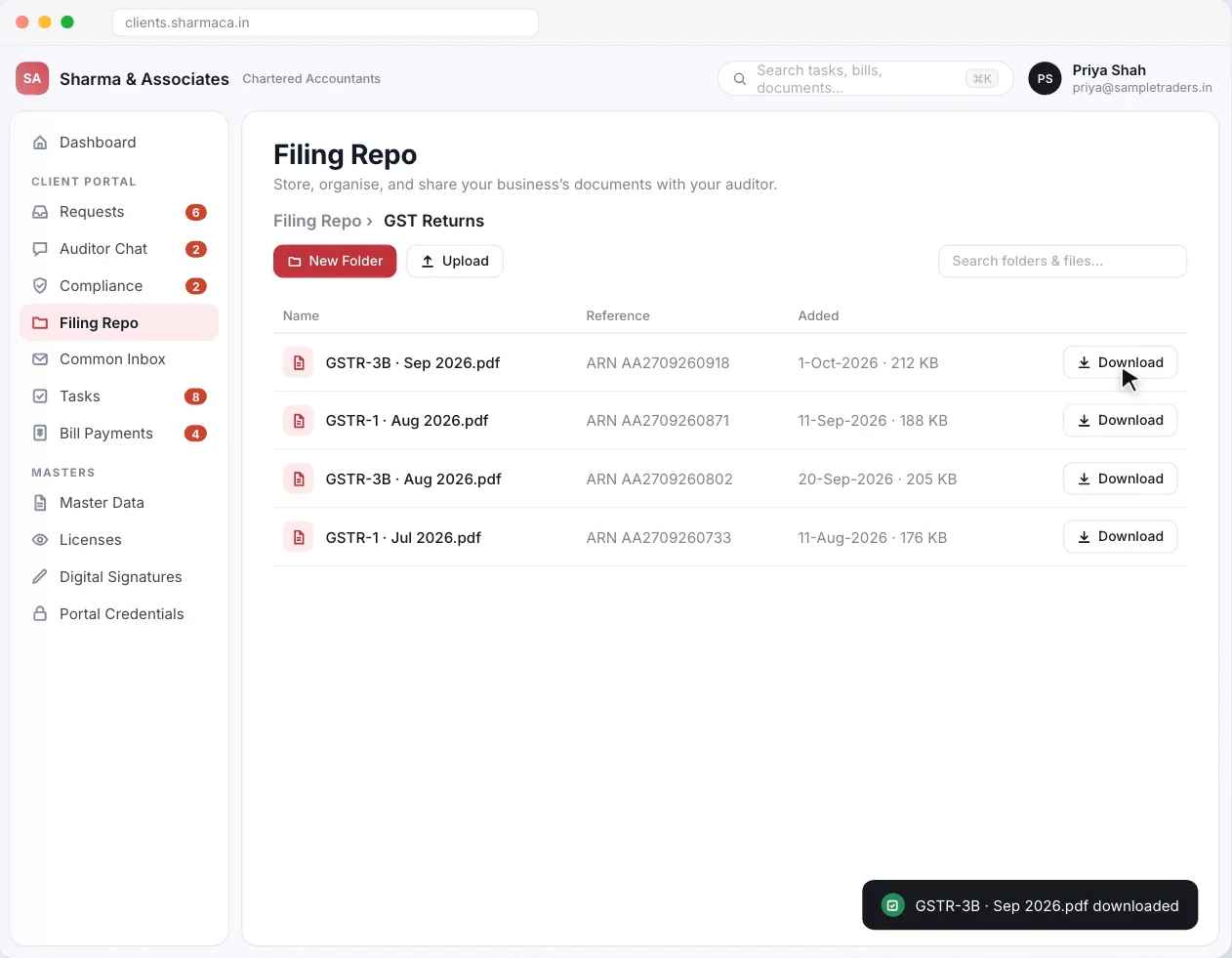
    Every request shows what is needed, for which task and by when. The client uploads against the request, and each file shows Received or Not received. Finished work goes into the Filing Repo. The firm keeps folders there, such as GST returns, bank statements and audit papers, and the client downloads what they need: a GSTR-3B filed on the GST portal, an ITR-V from the Income Tax e-filing portal, or a TDS certificate from TRACES.

    So the exchange runs like this. The client opens the portal and uploads the requested documents. The team picks them up, the firm shares the completed work, and the client downloads it. Attachments stop depending on one employee forwarding them.

    Turia Client Portal Document Requests screen showing an Advance Tax request with three received documents and a GSTR-1 request with an Upload button for the sales register
    Document Requests: each request tied to a task and due date, with Received or Upload against every file. Demo data.
    Turia Client Portal Filing Repo showing filed GST returns with download buttons
    The Filing Repo: filed returns and records the client can download any time. Demo data.
  3. Organised

    An employee opens one client, not one giant folder.

    4.3Client-wise Document Management

    Turia ties documents to the client record. An employee working on a GST return opens that client's documents rather than a shared folder of everyone's files.

  4. Logged

    A partner asks, “Did we ever get their Form 26AS?”

    4.4Digital Inward and Outward Document Register

    Turia's inward and outward register records what the firm received and what it delivered. (For choosing a register, see digital inward and outward register software.) It helps most when several employees handle the same client, or when a partner reviews collection and delivery.

  5. On WhatsApp too

    Some clients will still send it on WhatsApp.

    4.5WhatsApp and Email Communication

    A portal does not mean every client stops using WhatsApp. Turia works with WhatsApp Business and email, so configured document requests and reminders reach clients where they already are. The Document Collection Agent can send those requests and follow-ups automatically.

    Documents clients send on WhatsApp still come into Turia. An employee attaches each one to the right client's task; Turia does not file attachments into client folders automatically. See how WhatsApp documents reach the right task.

  6. Connected

    The portal shows clients the same records your team works from.

    4.6One Connected Practice Management Platform

    A client portal is far more useful when it connects to the firm's internal work. In Turia, the portal sits on top of:

    • Client Master
    • Tasks and recurring assignments
    • Compliance calendar
    • Document management
    • Billing and invoicing
    • Attendance and leave
    • Timesheets
    • DSC register and expiry
    • Team coordination
    • Notice management (add-on)
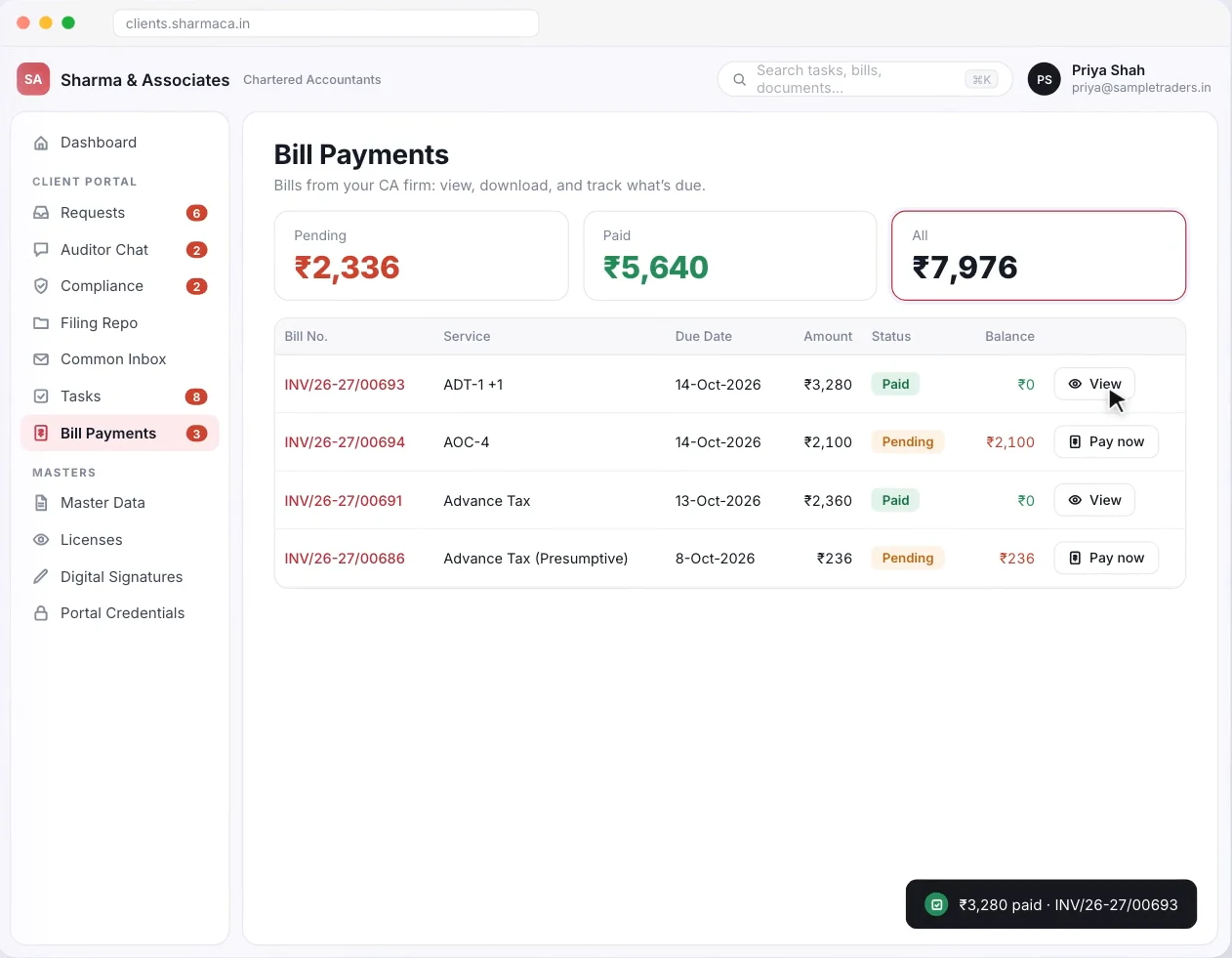
    Turia Client Portal Bill Payments screen showing pending, paid and total amounts with invoices that can be viewed or paid online
    Bill Payments in the portal: the client sees each invoice, what is paid and what is pending, and can pay online. Demo data.

So the firm manages far more than file exchange: it runs the internal work behind every client. For how all of Turia's modules connect, see which software can handle all the operations of a CA firm.

Chapter 5 · Who does what

Automation Breakdown: What Is Automatic and What Requires Action?

Separate document sharing, workflow automation and professional work. Here is who does what in the portal.

self-service

The client does it

  • Client document uploadClient-initiated
  • Client downloading shared documentsClient-initiated

your team's controls

The firm sets it up

  • Client access to the portalThrough configured portal access
  • Accessing uploaded documentsAvailable to authorised firm users
  • Sharing completed documentsFirm-initiated or workflow-dependent
  • Organising documents against client recordsDepends on the configured document workflow

runs on triggers

Can be automated

  • Sending configured document requestsCan be automated
  • Sending configured remindersCan be automated

your judgement

Needs a professional

  • Reviewing uploaded documentsEmployee or professional action
  • Preparing and filing returnsThe firm's compliance workflow and professional action

A client portal removes admin friction. It does not remove professional review, verification or statutory filing.

Chapter 6 · One bank statement, start to finish

A Realistic Workflow: How a CA Firm Can Use Turia's Client Portal

Take a firm with 300 GST clients that collects sales data, purchase data and bank statements every month. Here is a repeatable way to run it.

  1. 1

    Step 1: Create and organise client records

    The firm keeps its client information in Turia.

  2. 2

    Step 2: Give clients portal access

    The firm gives each client access to its branded Client Portal.

  3. 3

    Step 3: Request documents

    The team requests what the month's compliance needs. Configured workflows can send the requests and reminders.

  4. 4

    Step 4: Clients upload documents

    Clients upload files through the portal instead of email and WhatsApp.

  5. 5

    Step 5: The CA team processes them

    Employees open the documents, check them and work on the assigned tasks.

  6. 6

    Step 6: Share completed deliverables

    Once the return is ready and reviewed, the firm shares it through the portal.

  7. 7

    Step 7: Clients download their documents

    Clients download the filed documents whenever they need them.

The result is one repeatable process for document exchange, and far fewer scattered conversations for the team to manage.

Chapter 7 · What it really costs

Pricing and Additional Integration Costs

Look at total cost of ownership, not just the per-user price. Here are the questions to ask any vendor, with Turia's answers.

Is client portal access included?
Yes. A free version of the Client Portal is available to every Turia firm.
Is there a separate charge for each client login?
Turia lists no per-client charge. The paid tier is one storage pool for the whole client base.
Are there limits on the number of clients?
No. Every Turia plan includes unlimited clients.
How much document storage is included?
Free, client data kept for 45 days. The paid version adds a 100 GB pool shared across all clients.
Are additional storage charges applicable?
Only if you want long-term storage: ₹999 a month or ₹9,999 a year for a 100 GB pool.
Are WhatsApp Business API charges separate?
Yes. WhatsApp provider charges depend on your message volume.
Are there extra charges for integrations?
Confirm any third-party integrations you need for your setup.
Can the portal carry the firm's branding?
Yes. It is white-labelled with your firm's logo, colours and domain.
Can the firm export its documents if it moves software?
Yes. You can export your firm's data at any time, and Turia helps export everything if you leave.

The Client Portal sits on top of Turia's practice management plans. They run from ₹6,999 a year for up to 5 users to ₹34,999 for up to 60, excluding GST. Check current details on the pricing page, or see a worked cost-per-client example on the Client Portal page.

500+ CA firms use Turia Practice every day

P. Pattabhiramen and Co., Chartered Accountants logoPSDY & Associates, Chartered Accountants logoRNH & Co LLP logoAjith & Associates logoJoseph & Rajaram, Chartered Accountants logoIndia Startup Service (indiastartup.in) logoNRSR & Co logoGST Relief logoSKBCO, Chartered Accountants logoMRO & Associates logoMohan & Chandrasekhar, Chartered Accountants logoMohamed & Associates logo

Read what firms say on our testimonials page.

Chapter 8 · Who it's for

Which CA Firms Should Consider Turia?

A client portal pays off most for firms that:

Manage hundreds of individual and business clients
Receive documents through several channels
Want less dependence on WhatsApp and email attachments
Need a structured inward and outward document workflow
Want clients to access completed returns online
Have several employees handling client documents
Want client communication connected to practice management

If your biggest problem is collecting, organising and sharing documents, start with the client portal workflow. If you also want tasks, compliance, billing and staff in the same platform, evaluate Turia as a complete practice management system. Small team? See which software a CA firm with 5–10 employees should use.

Chapter 9 · Questions firms ask

Frequently Asked Questions About CA Client Portals

Which CA software offers a separate login for every client?

Turia does. Its Client Portal gives each client their own login to upload documents, download filed returns, see compliance status and bills, and chat with the firm. It is white-labelled with the firm's branding and has a mobile app.

Can clients upload documents directly to CA software?

Yes. In Turia's Client Portal, the firm raises a document request tied to a task and due date. The client uploads straight against it instead of sending files on WhatsApp or email.

Can clients download their filed GST and income tax returns?

Yes, once the firm shares them. Turia's Filing Repo holds filed returns, acknowledgements and other records in folders the client can download from at any time.

What is the difference between a client portal and Google Drive?

Google Drive stores and shares files. A CA client portal is built around the relationship between the firm and its clients. It has requests tied to tasks, a compliance view, bills, chat and the firm's own client records. It is designed for document exchange, not just storage.

Can a CA firm manage documents for hundreds of clients?

Yes. Turia organises documents around each client record, with access limited to that client. Every plan includes unlimited clients; check how much long-term storage you need when choosing between the free and paid portal.

Does a client portal eliminate WhatsApp communication?

No. Many clients still prefer WhatsApp. The portal becomes the organised place for document exchange, while WhatsApp and email carry requests and reminders.

Is Turia's Client Portal free?

There is a free version for every Turia firm that keeps client data for 45 days. The paid version, at ₹999 a month or ₹9,999 a year, adds a 100 GB storage pool shared across all clients.

Is a client portal useful for a small CA firm?

Yes. Even a five-person firm with a few hundred clients gains from one central place for document exchange. It cuts repeated follow-ups, makes documents easier to find and gives clients a more consistent experience.

Every client, one front door.

Build an Organised Digital Workflow Around Every Client

If your firm still runs document collection through individual WhatsApp chats and email threads, it may be time for a structured client portal.

Turia combines client management, document workflows, practice management and a white-labelled Client Portal to help CA firms organise how they work with clients. Instead of managing client documents as disconnected files, you build one organised workflow around every client.

Further reading

Request a DemoCall Us