Every document in. Every document out.

Best Software for Digital Document Inward and Outward Register in CA Firms

A CA firm receives and sends hundreds of documents a month, on paper and on screen. Most still track them in an Excel register someone updates when they remember, or in nobody's register at all.

Drawers, diaries and Excel, replaced → One minute on Turia's registers: who holds every DSC token, every licence renewal, and every office visit, logged. Demo data.

Chapter 1 · The direct answer

Which Software Should a CA Firm Use for Its Document Register?

If your firm moves hundreds of documents a month, don't use a separate Excel sheet. Use a practice management platform with a digital document register built in.

Turia covers both kinds of document movement. Its Document Movement Tracker is a digital inward/outward register for physical files, folders and DSC tokens. Digital documents are tracked through Client Portal requests on the way in and the Filing Repo on the way out. Both sit against the same client record, next to tasks and compliance.

A good register should answer five questions:

  1. Which document did we receive?
  2. From which client?
  3. When did it arrive?
  4. Who is processing it?
  5. When, and to whom, did it go back?

For a firm handling GST, Income Tax, TDS, audits and company compliance, that visibility changes how well it controls its documents.

Chapter 2 · Why the old register fails

The Problem: Why Traditional Document Registers Don't Work Well

Take a firm with 500 clients and 10 employees. Documents arrive every day through:

  1. WhatsApp
  2. Email
  3. Google Drive
  4. Physical copies
  5. Client portal
  6. Office visits

One employee gets a bank statement on WhatsApp. Another gets invoices by email. A third receives a file of originals at the front desk. Each saves them somewhere different and updates the Excel register when they remember.

At month-end, the partner asks whether a GST client's documents are all in. Someone now checks WhatsApp, email, shared folders and the spreadsheet, one by one.

No central record of incoming documents

There is no single reliable place to check what a client has sent.

Documents get misplaced

Files sit on someone's laptop, in the wrong folder, or inside an email thread.

No clear ownership

The partner cannot tell who received a document or who is meant to process it.

Outgoing documents are hard to track

Returns, statements and certificates go out with no consistent record of what was sent, or when.

Employees waste time searching

The team spends hours locating documents instead of doing accounting and compliance work.

A digital inward and outward register fixes this by giving every document movement one structured record.

Chapter 3 · What a register must record

What Should an Ideal Digital Document Register Offer?

An Excel sheet works for a handful of documents. A growing CA firm needs more. Look for:

3.1Digital inward register

A record of every document the firm receives.

  • Client name
  • Document name or category
  • Date received
  • Financial or assessment year
  • Source or channel
  • Employee responsible
  • Related task
  • Current status

3.2Digital outward register

A record of what the firm delivered, when, and to which client.

  • GST return acknowledgements
  • ITR acknowledgements
  • Tax audit reports
  • Financial statements
  • Certificates
  • Computation sheets

3.3Client-wise organisation

Documents linked to the right client record, so no one searches a shared folder of hundreds of clients.

3.4Search and retrieval

Find a document quickly by client and document details.

3.5Responsibility and task tracking

Receiving a document is step one. Once a bank statement arrives, the right employee should know which assignment it belongs to.

3.6Client document exchange

A structured way to share documents with clients, ideally a client portal for uploads and downloads.

3.7Access control and security

Not every employee needs every client's documents. Check permissions, data handling and backups before you buy.

On security, Turia encrypts data in transit (TLS 1.2+) and at rest (AES-256), and firm admins set permissions for each user and module. See how Turia protects your data.

Chapter 4 · Paper and digital, both covered

How Turia Helps CA Firms Manage Document Inward and Outward Workflows

A CA office moves two kinds of documents: physical files and digital ones. Turia handles each in the right place, against the same client.

  1. Paper, logged

    A file of originals leaves the office for the bank.

    4.1A Digital Register for Physical Documents

    Turia's Document Movement Tracker is the digital version of the paper inward/outward register. It is built for physical files, folders, registers and DSC tokens, and it is included on every Turia plan.

    When a document leaves the office, it is logged out against the client: what it is, who is taking it and where it is going. While it is out, everyone can see who holds it, and long absences stand out. When it comes back, checking it in completes a chain-of-custody record for that client.
  2. Digital, inward

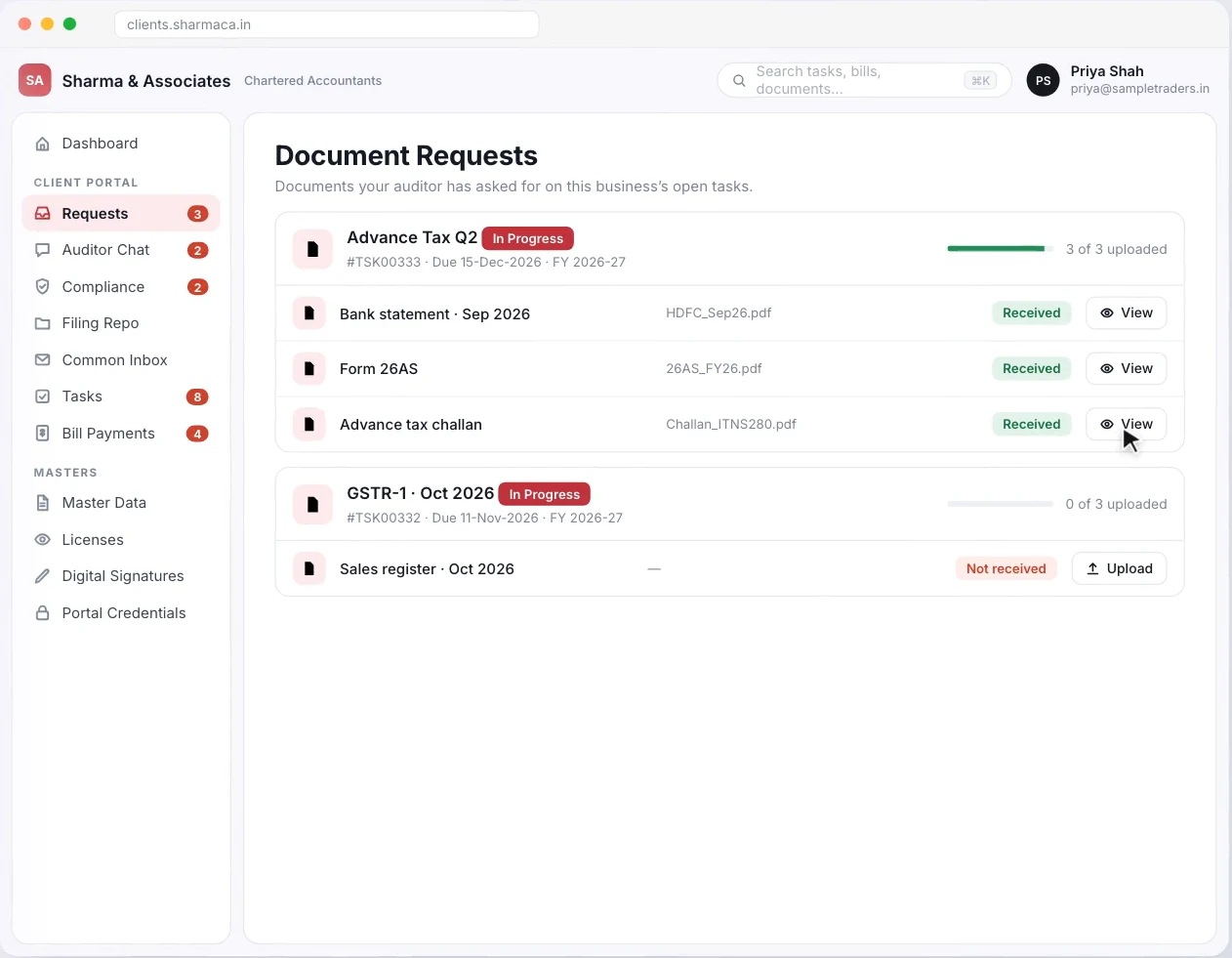
    The client uploads three files against one request.

    4.2Client-wise Document Management for Digital Files

    Digital documents come in through the Client Portal. The firm raises a request tied to a task and due date, the client uploads against it, and every file shows Received or Not received. That status is the inward register for digital documents, kept against the client record.

    An employee working on a client's GST return opens that client's documents, not a general folder. It helps most when several employees work on the same client.

    Turia Client Portal Document Requests showing received documents and one awaiting upload
    Digital inward: each request shows what has been received and what is still awaited. Demo data.
  3. Digital, outward

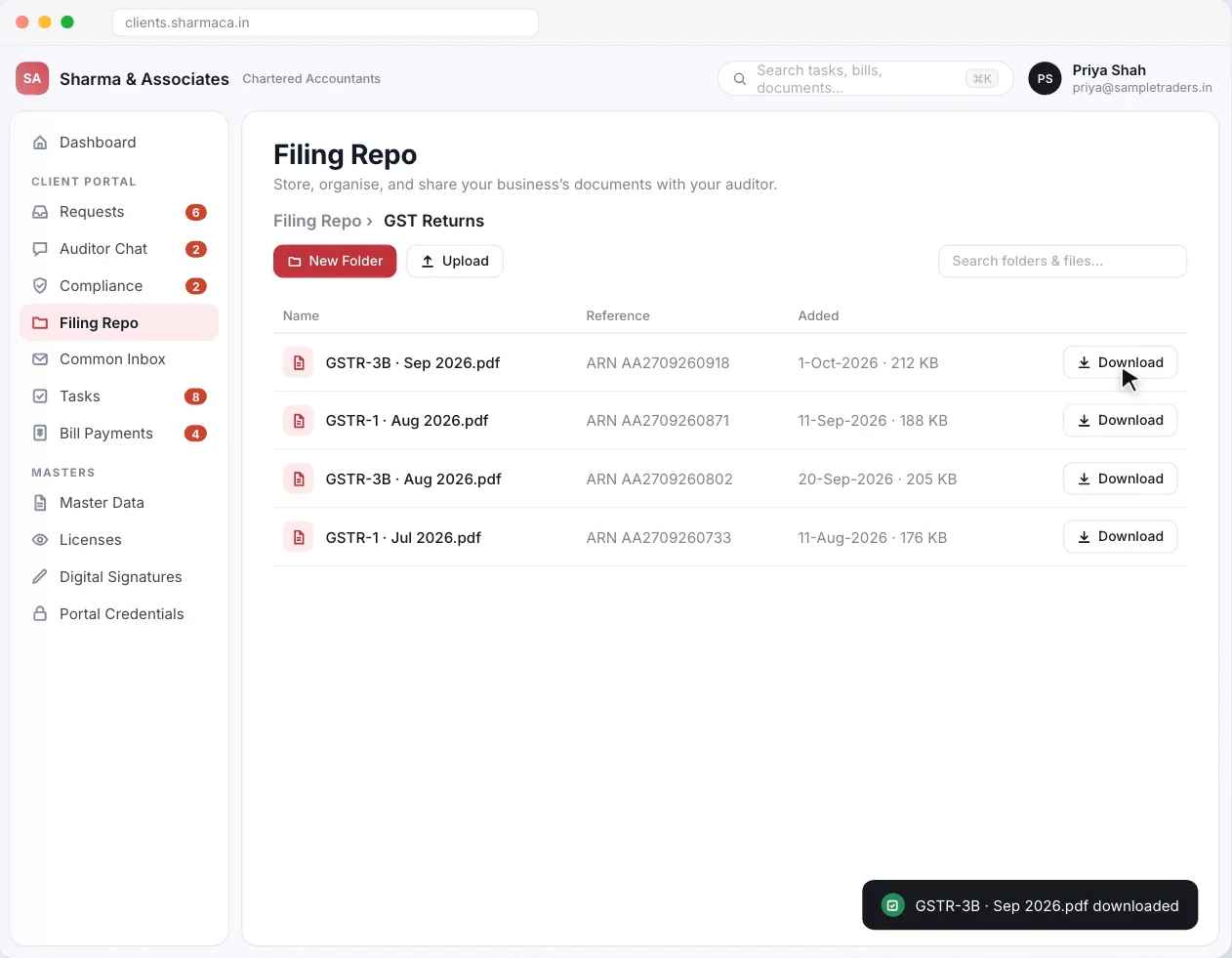
    A filed GSTR-3B goes back to the client.

    4.3Client Portal for Document Exchange

    Completed work goes out through the portal's Filing Repo, where clients download filed returns, acknowledgements and records whenever they need them. Turia's Final Document Agent can send completed documents to clients automatically once a filing is done.

    A GSTR-3B filed on the GST portal or an ITR-V from the Income Tax portal lands where the client can find it. Clients stop asking for copies the firm already sent, and the firm has one consistent place for outgoing documents.

    Turia Client Portal Filing Repo with filed GST returns available to download
    Digital outward: filed returns in the Filing Repo, ready for the client to download. Demo data.
  4. On WhatsApp too

    Half the documents still arrive on WhatsApp.

    4.5WhatsApp and Email Communication

    Clients will not all use one channel. Turia works with WhatsApp Business and email, and the Document Collection Agent sends configured document requests and reminders there.

    Documents sent on WhatsApp come into Turia, where an employee attaches each one to the right client's task. Turia does not file attachments into client folders automatically. More on managing WhatsApp documents.

  5. The partner's view

    “Where are we stuck this month?”

    4.6Better Visibility for Partners

    With documents, tasks and timesheets in one system, partners see what work is pending and who is handling it. They also see where collection is delayed and which tasks need attention. The point is not just storing documents; it is managing the work that depends on them.

Other registers a CA office keeps. Turia digitises those too:

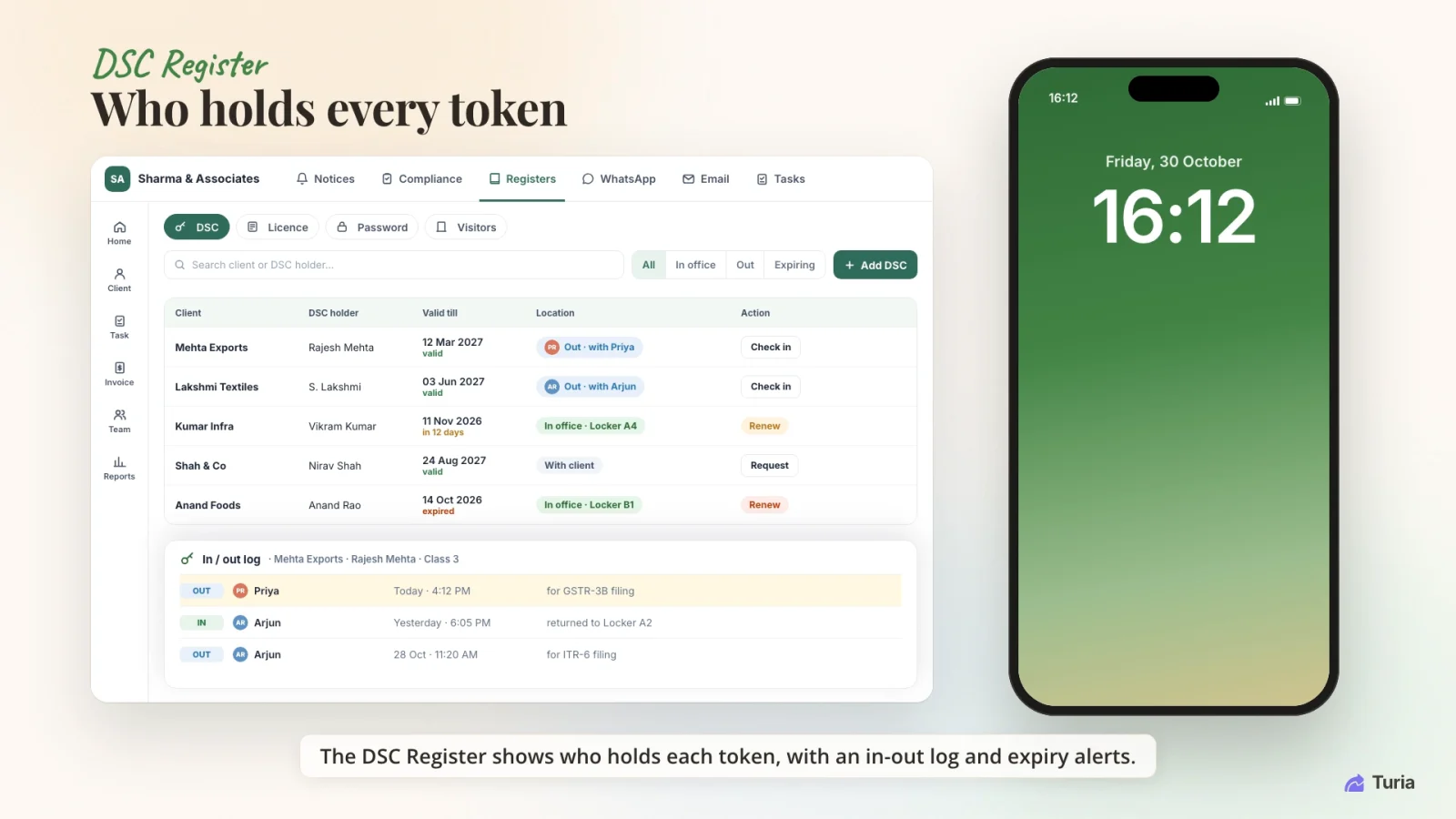
DSC Register

Who holds every token, with an in/out log and expiry alerts.

Learn more →

Licence Register

Every client licence, with renewal reminders.

Learn more →

Visitors Register

Every office visit logged, couriers and document deliveries included.

Learn more →
Turia DSC Register showing each client's token holder, validity and location, with the in/out log open for one token
The DSC Register's in/out log: who took a token, when, and when it came back. Demo data.

Chapter 5 · Who does what

Automation Breakdown: What Can Be Automated?

A digital register does not make every document task automatic. Here is what the software handles and what still needs your team.

Turia keeps the record

System-supported

  • Maintaining client recordsSystem-supported
  • Logging physical documents out and inRecorded in the Document Movement Tracker
  • Assigning work to employeesSystem-supported

client or firm shares

Through the portal

  • Client uploading documents through the portalClient-initiated
  • Sharing completed documents through the portalFirm-initiated, or the Final Document Agent

runs on triggers

Can be automated

  • Sending configured document requestsCan be automated
  • Sending configured remindersCan be automated

judgement stays human

Needs your team

  • Reviewing received documentsEmployee action
  • Checking accuracy and completenessEmployee action
  • Preparing returns and reportsProfessional or employee action
  • Final review and approvalAuthorised professional action

The win is less repetitive admin, with professional control over the accounting and compliance work kept intact.

Chapter 6 · A month of GST documents

Real Workflow: How a CA Firm Can Manage Document Movement in Turia

Take a firm running monthly GST compliance for 300 clients.

  1. 1

    Step 1: Client sends documents

    The client uploads invoices, bank statements and other files against the firm's request.

  2. 2

    Step 2: Documents are organised

    The team opens the client's record and finds the documents there.

  3. 3

    Step 3: Someone owns it

    The partner or a senior allocates the related assignment to a team member.

  4. 4

    Step 4: Work is completed

    The employee processes the documents and completes the accounting or compliance work.

  5. 5

    Step 5: Deliverables are shared

    After review, the firm shares the completed documents with the client through the portal.

  6. 6

    Step 6: The register stays complete

    What was received and what was delivered both stay on record for that client.

The same loop works for Income Tax, TDS, audit and other assignments. When originals have to leave the office, for a bank or a signature, they are logged out and back in through the Document Movement Tracker.

Chapter 7 · What to check before you buy

Pricing and Additional Costs: What Should CA Firms Check?

Look at the total cost, not just the subscription. Here are the questions to ask, with Turia's answers.

Is the inward and outward register included?
Yes. The Document Movement Tracker is included on every Turia plan.
Is client portal access and storage included?
There is a free portal for every firm; long-term storage is a paid add-on. The client portal post covers its pricing in full.
Are there charges per client?
No. Every Turia plan includes unlimited clients.
Are WhatsApp Business API charges separate?
Yes, and they depend on your message volume.
Are email or cloud storage integrations included?
Gmail and Outlook integration is in every plan. Confirm any other cloud storage integration you need.
Can documents be exported if the firm changes software?
Yes. You can export your firm's data at any time, and Turia helps you export everything if you leave.
What backup and recovery options are available?
Data is backed up regularly on redundant cloud storage and can be restored from recent snapshots.

For portal storage tiers, see what a CA client portal really costs. For plans, see the Turia pricing page.

500+ CA firms use Turia Practice every day

P. Pattabhiramen and Co., Chartered Accountants logoPSDY & Associates, Chartered Accountants logoRNH & Co LLP logoAjith & Associates logoJoseph & Rajaram, Chartered Accountants logoIndia Startup Service (indiastartup.in) logoNRSR & Co logoGST Relief logoSKBCO, Chartered Accountants logoMRO & Associates logoMohan & Chandrasekhar, Chartered Accountants logoMohamed & Associates logo

Turia has become an essential part of our firm's daily operations. Features like task assignment, compliance reminders, document management, and client tracking have saved us a lot of time.

— Nafeez Khan, Chartered Accountants

Chapter 8 · Who it's for

Which CA Firms Should Consider Digital Document Register Software?

A digital inward and outward register pays off most for firms that:

Receive documents from hundreds of clients
Have several employees handling client files
Need visibility into incoming and outgoing documents
Search WhatsApp and email for attachments too often
Want to stop relying on Excel registers
Need a structured document exchange process
Want documents connected to tasks and compliance work

If your firm still tracks document movement across spreadsheets, inboxes and WhatsApp chats, a central practice management system makes a real difference. For the client side of document exchange, read which CA software offers client login, document upload and download.

Chapter 9 · Questions firms ask

Frequently Asked Questions About Document Registers

What is a digital inward register in a CA firm?

A digital inward register records documents a CA firm receives from clients or others. It captures details such as the client, document type, date received and the employee responsible.

What is a digital outward register?

A digital outward register records documents the firm sends to clients or others, such as filed return acknowledgements, financial statements, certificates and reports.

Can I maintain an inward and outward register in Excel?

Yes, for a small practice with few documents. As clients and staff grow, a dedicated register linked to client records and tasks keeps things organised in a way a spreadsheet cannot.

Can Turia track physical files and DSC tokens?

Yes. Turia's Document Movement Tracker logs physical files, folders and DSC tokens out and back in against the client. It records who took them and where they went. The DSC Register adds an in/out log for every token.

Which software is best for document management in a CA firm?

Look for client-wise organisation, inward and outward tracking, document sharing, access controls and a link to practice management. Turia is one option for firms that want document movement alongside the rest of their practice operations.

Can a CA firm track documents received through WhatsApp?

With Turia, yes. Documents sent to the integrated WhatsApp number come into Turia, and an employee attaches each one to the right client's task. Turia does not automatically file attachments into client folders.

Why connect document management with task management?

Documents are collected to complete a specific assignment. Linking the two lets the firm assign responsibility, track progress and spot pending work.

Is document register software useful for a small CA firm?

Yes. Even a small firm benefits from one structured place to track document movement, and it becomes more valuable with every client and employee added.

Nothing out without a record. Nothing in without an owner.

Spend Less Time Searching for Documents

Turia helps CA firms organise client records, document movement, tasks and internal operations in one platform. Physical files are logged out and in; digital files arrive against requests and leave through the portal.

The aim is simple: less time searching for documents, and more time on the client work that matters.

Further reading

Request a DemoCall Us