
From chat to task, nothing lost

Which Software Helps CA Firms Manage Documents Received on WhatsApp?

Your clients send bank statements, invoices and Form 16s on WhatsApp every day. The hard part is not receiving them. It is getting each one to the right client and the right piece of work.

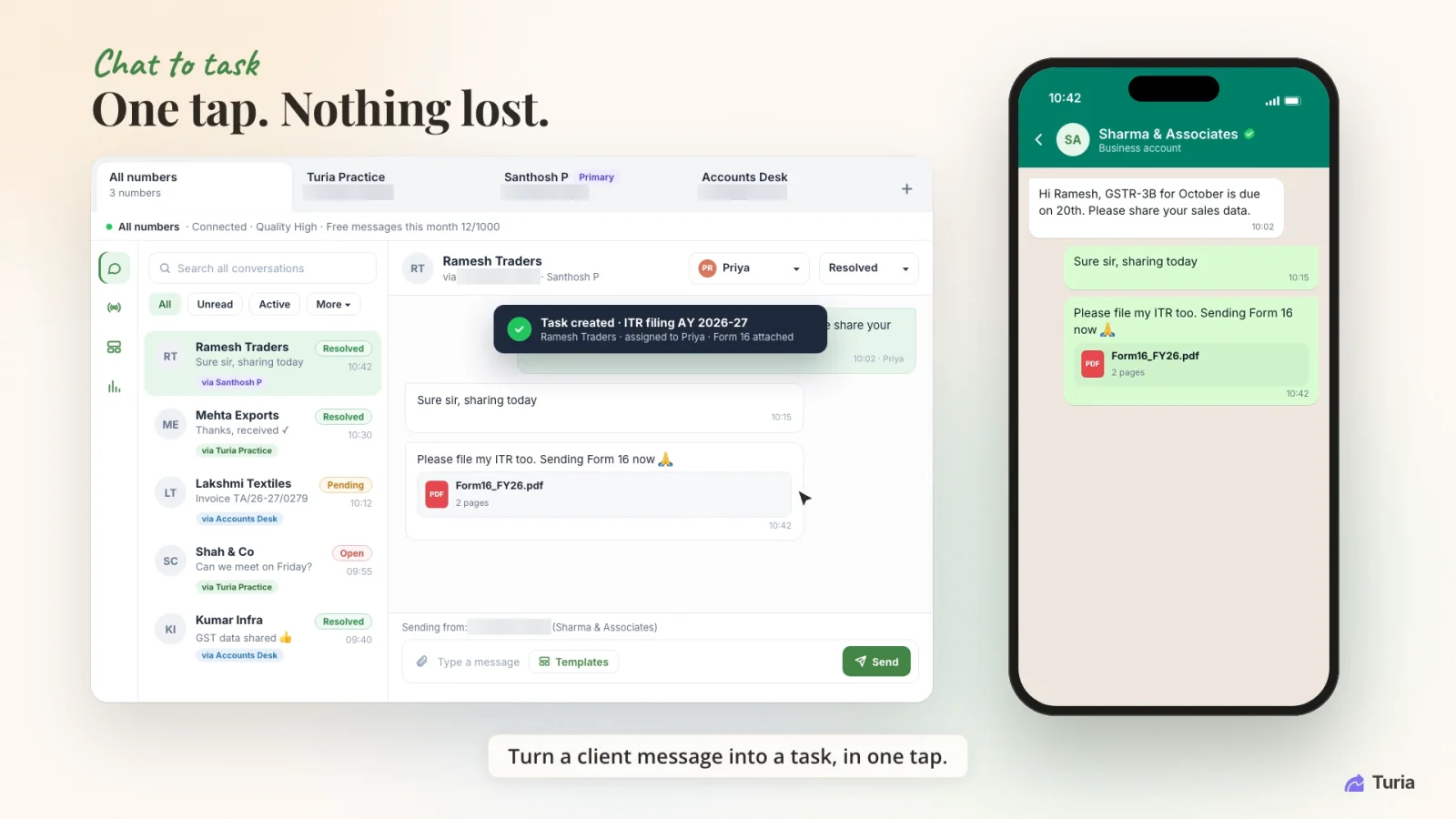
Turia shared WhatsApp inbox where a client's Form 16 becomes an ITR filing task assigned to an employee
One message, one task → A client's Form 16 on WhatsApp becomes an ITR task in Turia, assigned to Priya with the file attached. Demo data; the firm's phone numbers are masked.

Chapter 1 · The direct answer

Which Software Helps CA Firms Manage WhatsApp Documents?

Use practice management software that connects WhatsApp to your document and task workflows, rather than managing documents chat by chat.

Turia integrates WhatsApp with its practice management platform. Documents sent to the integrated WhatsApp channel come into Turia, where employees review them and attach each one to the relevant client's task.

Your team stops switching between WhatsApp, email, Excel and a task app. It handles incoming WhatsApp documents inside Turia and connects them to the work for that client. For the wider picture, see WhatsApp automation for CA firms.

Chapter 2 · WhatsApp, the accidental filing cabinet

The Problem: WhatsApp Became an Unofficial Document Management System

Take a firm with 400 GST clients and five employees. Every month, clients send bank statements, invoices and purchase data on WhatsApp, each to whichever employee they usually message. The problems are familiar:

Hundreds of chats

Documents are spread across hundreds of WhatsApp conversations.

Manual downloads

Employees download and organise every attachment by hand.

Which assignment?

It is hard to tell which document belongs to which piece of work.

Partners can't see it

Incoming documents sit on employees' phones, out of the partner's view.

Constant app-switching

Staff jump between WhatsApp and the practice management software all day.

Files cut off from tasks

A document can sit in a chat, disconnected from the task that needs it.

The problem is not WhatsApp. It is that client chats are not connected to the firm's own work.

Chapter 3 · What the software must do

What Should an Ideal WhatsApp-Integrated CA Software Offer?

Look for these seven capabilities:

WhatsApp integration
Incoming client messages are available inside the firm's own platform
Central document visibility
Employees can see documents that came in through the integrated channel
Client-task association
Each incoming document can be connected to the right client's task
Task management
The firm knows which assignment needs the document
Document organisation
Documents stay reachable in the context of the client work
Automated communication
Configured document requests and reminders go out on their own
Client portal
Clients get a second channel to upload and download documents

Chapter 4 · From chat to task

How Turia Helps Manage WhatsApp Documents

  1. One inbox

    Partner's number, articles' numbers, the office number. All of them.

    4.1WhatsApp Integration Inside Turia

    Clients often have several of the firm's numbers saved: the partner's, an article's, the office line. Turia connects each WhatsApp number the firm uses into one shared inbox, built on the official WhatsApp Business Platform and included on every Turia plan.

    When a client sends a document to the integrated channel, it comes into Turia. Every chat shows which number it arrived on, its status and who owns it, so documents stop living on one person's phone.
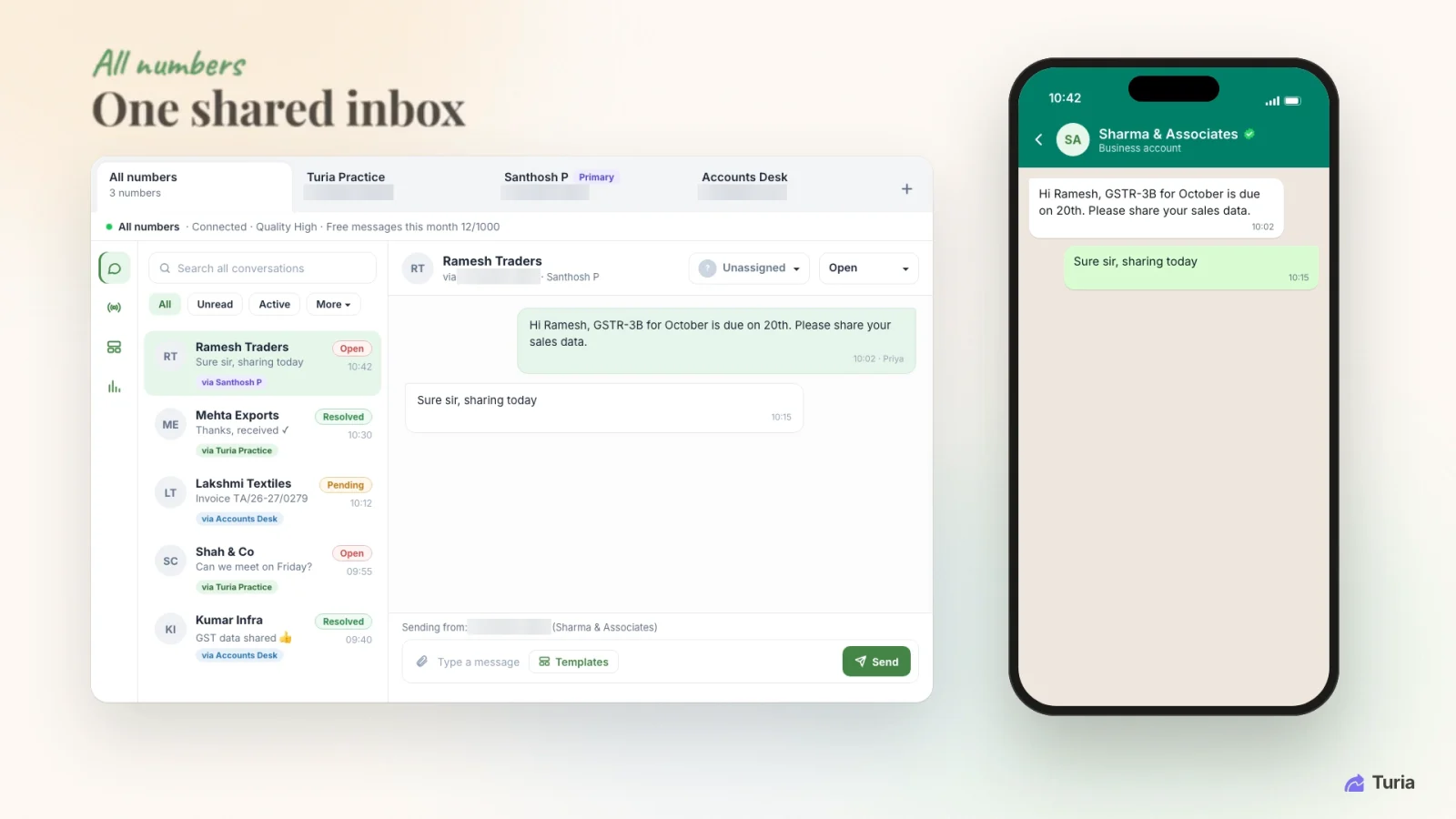

    Turia shared WhatsApp inbox with three connected firm numbers, client chats marked open, resolved or pending, and the number each chat came in on
    Every connected WhatsApp number in one shared inbox. Demo data; the firm's phone numbers are masked.
  2. Chat to task

    “Please file my ITR too. Sending Form 16 now.”

    4.2Assign Incoming Documents to Client Tasks

    This is the heart of the workflow. Say a client sends a bank statement on WhatsApp. The employee:

    1. Views the incoming document in Turia.
    2. Identifies the client and the assignment it is for.
    3. Selects the right client task.
    4. Attaches the document to that task.
    5. Carries on with the assignment.

    The employee stays in control: they identify the client and choose the task. Turia does not automatically recognise each attachment and file it into the client's folder.

    Turia shared WhatsApp inbox where a client's Form 16 PDF has been turned into an ITR filing task assigned to an employee, with the file attached
    A Form 16 from WhatsApp becomes an ITR task, assigned to Priya, with the file attached. Demo data; phone numbers masked.
  3. Tied to the work

    Every file is for something.

    4.3Manage Tasks Alongside Documents

    A document is nearly always needed for a specific assignment. Turia's task management organises those assignments, allocates responsibility and tracks progress, with the document sitting on the task:

    • Bank statement → accounting
    • Sales invoices → GST preparation
    • Purchase invoices → reconciliation
    • TDS details → return preparation
    • Audit documents → audit assignment
  4. Asking for it

    Nobody types “gentle reminder” again.

    4.4Document Collection Agent

    Turia's Document Collection Agent sends configured document requests and follow-ups on WhatsApp and email. Instead of employees sending the same reminder again and again, the firm sets up the workflow once, and pending documents are chased automatically.

  5. Another door

    Some clients prefer to upload it themselves.

    4.5Client Portal

    Turia's Client Portal gives clients their own login to upload documents against a request and download what the firm shares. A free version is available to every firm. It gives you an alternative to collecting every document over WhatsApp.

Chapter 5 · Who does what

Automation Breakdown

Turia brings WhatsApp documents into the firm's platform. Your employees keep control of matching each one to the right client task.

comes in on its own

Handled by Turia

  • WhatsApp integrationIntegrated with Turia
  • Incoming WhatsApp documentsCome into Turia's shared inbox
  • Viewing incoming documentsAvailable to employees in Turia
  • Connecting documents to assignmentsThrough task assignment

your team decides

Employee action

  • Identifying the relevant clientEmployee action
  • Assigning a document to a client taskEmployee action
  • Reviewing documentsEmployee or professional action

runs on triggers

Can be automated

  • Sending configured document requestsCan be automated
  • Sending configured remindersCan be automated

Chapter 6 · One Form 16, start to finish

Example: A Realistic WhatsApp Document Workflow

Take a firm running monthly GST compliance for 300 clients.

  1. 1

    Step 1: A client sends documents

    Purchase invoices arrive on the firm's integrated WhatsApp number.

  2. 2

    Step 2: They appear in Turia

    The documents show up in the shared inbox, against the client's chat.

  3. 3

    Step 3: An employee reviews them

    The employee opens the documents and checks what has arrived.

  4. 4

    Step 4: Assigned to the GST task

    The employee picks the client and attaches the documents to that client's GST task.

  5. 5

    Step 5: The work gets done

    The responsible team member processes the documents as part of the GST assignment.

  6. 6

    Step 6: The task moves on

    The employee updates the task as the work progresses.

WhatsApp conversations and internal task management, finally in one place.

Chapter 7 · What to check before you buy

What Should CA Firms Check Before Buying?

Ask any vendor to show you these in a demo. Here are Turia's answers.

How do incoming WhatsApp documents appear?
In Turia's shared inbox, against the client's chat, across every connected number.
Can employees assign incoming documents to client tasks?
Yes. An employee attaches each document to the right client's task.
Do documents stay accessible after assignment?
Yes. They sit on the task, alongside the rest of the client's work.
Can document requests and reminders be automated?
Yes, through the Document Collection Agent and configured workflows.
Are WhatsApp usage or API charges separate?
Yes. WhatsApp provider charges depend on your message volume.
Is there a client portal too?
Yes, including a free version for every firm.
Are attachments filed into client folders automatically?
No. The employee chooses the client and task for each document.

For tracking physical files and the full inward/outward picture, see digital inward and outward register software. Current plans are on the pricing page.

500+ CA firms use Turia Practice every day

P. Pattabhiramen and Co., Chartered Accountants logoPSDY & Associates, Chartered Accountants logoRNH & Co LLP logoAjith & Associates logoJoseph & Rajaram, Chartered Accountants logoIndia Startup Service (indiastartup.in) logoNRSR & Co logoGST Relief logoSKBCO, Chartered Accountants logoMRO & Associates logoMohan & Chandrasekhar, Chartered Accountants logoMohamed & Associates logo

The features I find most useful are WhatsApp chat assignment to staff, Sprints, Action Center, Notice & Compliance management, and Lead management.

— Raju & Rajesh, Chartered Accountants

Chapter 8 · Questions firms ask

Frequently Asked Questions About WhatsApp Documents

Can Turia receive documents from WhatsApp?

Yes. Turia integrates WhatsApp, and documents sent to the integrated WhatsApp channel come into Turia's shared inbox.

Can employees assign WhatsApp documents to client tasks?

Yes. Employees view incoming documents in Turia and attach each one to the relevant client's task.

Does Turia automatically save every WhatsApp attachment into the client's folder?

No. An employee identifies the client and assigns each incoming document to the right task. Turia does not automatically recognise attachments and file them into client folders.

Can Turia connect more than one WhatsApp number?

Yes. Turia brings every WhatsApp number the firm connects into one shared inbox. Chats with the partner, staff and the office line are all in one place.

Why connect WhatsApp documents with tasks?

It ties incoming client documents to the work that needs them. Employees handle documents in the context of the assignment instead of hunting through separate WhatsApp chats.

Can Turia automate document collection reminders?

Yes. Turia's Document Collection Agent sends configured document requests and follow-ups on WhatsApp and email.

Does Turia also provide a client portal?

Yes. Turia's Client Portal gives clients their own login to upload and download documents, with a free version for every firm.

Client chats stay with your firm.

Connect Every WhatsApp Document to the Right Client and Task

If your firm receives hundreds of documents on WhatsApp, the challenge is not receiving the files. It is connecting each file to the right client and the right assignment.

Turia brings incoming WhatsApp documents into its practice management platform, where employees assign them to the relevant client tasks. With task management, the Document Collection Agent and the Client Portal alongside, client communication and compliance work finally run in one organised place.

Further reading

Request a DemoCall Us