
30 Reasons to Use Turia CA Practice Management Software
A factual, plan-accurate rundown of why CA, CS, and CMA firms across India are moving client management, compliance tracking, and billing onto one system.
Last reviewed 25 August 2026
Quick Answer
Turia is priced as a flat annual fee based on firm size, from ₹6,999/year for up to 5 users (Basic) to ₹34,999/year for up to 60 users (Enterprise). Every plan includes the exact same full feature set — client and lead management, tasks, billing, DSC and License Registers, Chat, WhatsApp Business, Email Integration, Automations, and more — so cost scales with team size, not which features you need. A 7-day free trial with no credit card required comes with every plan.
30 Reasons, Grouped by What They Actually Fix
Clients & Growth
Lead management
Capture and track prospective clients from first enquiry through to conversion with Turia's lead management module, so new business doesn't sit forgotten in someone's inbox.
Client master data
Maintain complete client management records in one place, including group companies, engagement details, and service history, on every plan.
Proposal Management
Turn a qualified lead straight into a formal, sendable proposal without leaving Turia, closing the gap between a lead saying yes and an actual signed engagement letter.
Client Portal
Give clients live visibility into their engagement status and let them upload or download documents directly, on every plan, cutting down the "where are we on my GST filing" phone calls.
Billing and invoicing
Manage CA billing software workflows end-to-end: create pro forma invoices, manually add billable time and expenses from your service or task records, and convert a pro forma into a final invoice when the client approves it.
Task & Delivery
Task management
Assign, track, and prioritize work with dedicated CA task management software instead of chasing status updates over email.
Recurring tasks
Set up monthly and quarterly compliance work (GST, TDS, ROC) once, and Turia recreates the task on schedule instead of you rebuilding it every cycle.
Service catalog with templates, SOPs, and checklists
Build a reusable service catalog with standard operating procedures, checklists, and document request lists, so every staff member follows the same process for a given engagement.
Reports
Get visibility into task completion, staff workload, and firm performance through built-in reporting, without exporting data to a separate BI tool.
Role-based access
Control what each team member and partner can see and edit, which matters once a firm has articled staff, associates, and multiple partners on the same system.
Homepage dashboard
A single dashboard view of what's due today, what's overdue, and what's assigned to whom, so partners don't need to ask for a status update in a team meeting.
Compliance & Security
DSC Register
Track digital signature certificate expiry dates for every client so you're not discovering an expired DSC mid-filing.
License Register
Track statutory licenses and registrations — GST, professional tax, shops & establishments — per client with Turia's License Register, kept separate from the DSC Register so renewals of either kind never slip through.
Password Manager
Store client and government portal credentials in an encrypted, access-controlled register instead of a shared spreadsheet or sticky notes.
Document Movement Tracker
Know exactly which physical or digital document is with which client or staff member at any point, using Turia's Document Movement Tracker, useful for firms still handling original paperwork.
Compliance-aware task structure
Build your recurring tasks around GST return tracking, ROC filing requirements per the Ministry of Corporate Affairs portal, and TDS due dates, cross-checked manually against the GST Portal and Income Tax e-filing portal as filing rules change.
Notice Board
A shared internal board for firm-wide announcements, staff recognition, birthdays, and policy updates — separate from statutory notice tracking, and included on every plan.
Team & Communication
Visitor Management
Log client and visitor entries at your office, useful for firms that want a digital front-desk record rather than a paper register.
Timesheets
Track time tracking for CA work at the staff level, so you know where billable hours are actually going before you invoice a client.
Employee reimbursements
Handle staff expense claims inside the same system as tasks and clients, instead of a separate approvals thread.
Chat
Built-in team chat keeps internal coordination tied to the task or client it's about, included on every plan rather than gated to a top tier.
WhatsApp Business integration
Convert client WhatsApp messages directly into tracked tasks through WhatsApp-to-task automation, included on every plan.
Email Integration
Convert incoming client emails into tasks through email-to-task automation, also included on every plan.
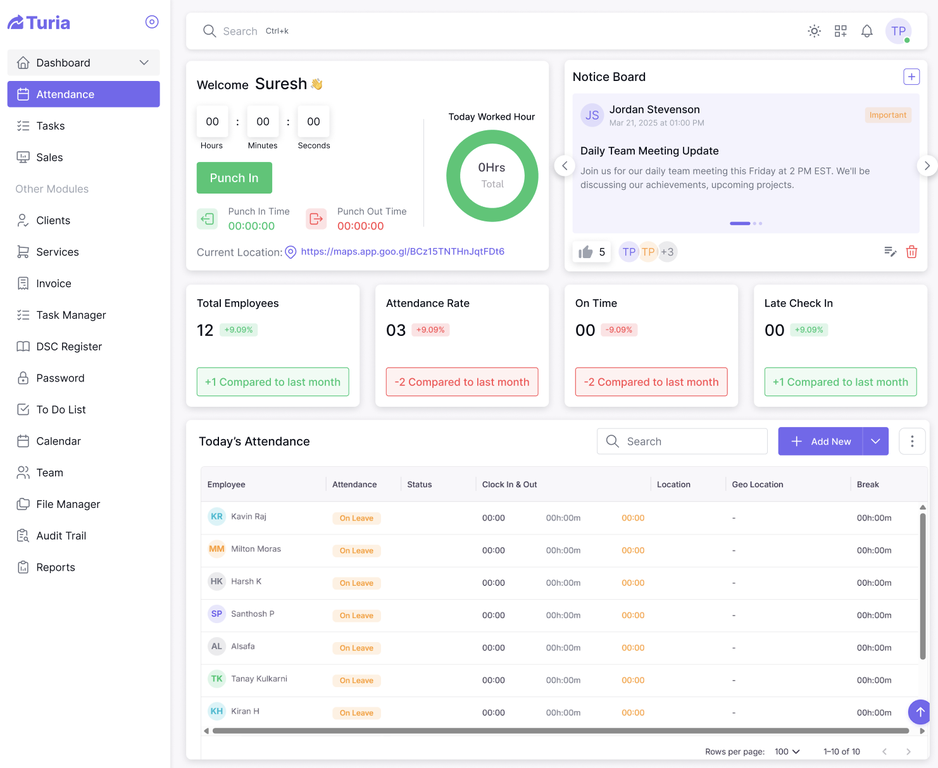
Attendance & Leave with geo-location
Track staff attendance and leave with geo-tagged check-ins, useful for firms with audit staff or field visits who need a verifiable record of where the team actually was, not just a self-reported timestamp.
Automation, Billing & Pricing
Automations and workflows
Set up rule-based workflow automation for repetitive multi-step processes, on every plan rather than a top-tier add-on.
Multi-Billing Organizations
Manage billing across multiple firm entities or branches from one account, useful for multi-partner or multi-branch practices, included on every plan.
Reminders Manager
Configure custom reminder rules across clients and tasks beyond the default recurring-task alerts, included on every plan.
Sprint Planner
Plan work in short sprints for teams that want to batch compliance work into focused cycles, included on every plan.
Transparent, flat annual pricing
Turia is priced as a flat annual fee by firm size, from ₹6,999/year for up to 5 users to ₹34,999/year for up to 60 users, with the exact same full feature set on every plan. Prices are exclusive of GST.
Fast, free onboarding
Every plan includes free onboarding, training, and migration support, with most firms going live in a few days to about a week — not the multi-week rollout some legacy tools require.
Who Turia Is Built For
Turia fits CA, CS, and CMA firms in India that are past the stage of running client work purely out of Excel and WhatsApp, and want one system for compliance management, client communication, and billing. Solo practitioners working entirely alone may find every Turia plan sized for at least a small team rather than a single user, worth checking the pricing page against your actual headcount before signing up.
500s of CA firms use Turia Practice every day












Independently reviewed by CA firms using Turia:
Final Word
Turia's value isn't a headline number of features, it's whether client records, tasks, compliance deadlines, billing, WhatsApp, and email all sit in one place your whole team actually uses, on every single plan. If that's what's missing at your firm today, the 7-day free trial is the fastest way to check it against your own client list rather than take this post's word for it.
Frequently Asked Questions
Is Turia only for large CA firms, or does it work for smaller practices too?
No. Turia's smallest plan, Basic, covers up to 5 users for ₹6,999/year, so it works for small practices as well as larger firms. Firms with 5-20 staff are the most common fit, and pricing scales with team size across five plans up to 60 users.
What's the actual difference between Turia's five plans?
All five plans — Basic, Starter, Growth, Professional, and Enterprise — include the exact same full feature set: client management, tasks, billing, DSC and License Registers, Chat, WhatsApp Business, Email Integration, Automations, and everything else described in this post. The only difference between plans is the number of users included, from up to 5 on Basic to up to 60 on Enterprise.
Does Turia automatically generate invoices from timesheets?
Not automatically. Billable time and expenses tracked in Timesheets or against a service are manually added into the invoice or service workflow, and a pro forma invoice can be manually converted into a final invoice once approved. There's no fully automatic timesheet-to-invoice pipeline.
Does every Turia plan include WhatsApp Business integration?
Yes. WhatsApp Business integration, which lets client messages convert directly into tracked tasks, is included on every Turia plan, not limited to a higher-priced tier.
Is there a client portal included with Turia?
Yes, on every Turia plan. Clients get live status visibility on their engagements and can upload or download documents directly through the portal, without needing to email the firm for updates.
How long does it take to onboard a firm onto Turia?
Onboarding, training, and migration support are free on every plan. Most firms are up and running in a few days to about a week, depending on how much historical client data needs to be migrated.
What does Turia cost per user, and how is pricing structured?
Turia is priced as a flat annual fee based on firm size rather than per user: ₹6,999/year for up to 5 users (Basic), ₹9,999/year for up to 10 (Starter), ₹16,999/year for up to 20 (Growth), ₹24,999/year for up to 40 (Professional), and ₹34,999/year for up to 60 (Enterprise). Prices are exclusive of GST, and every plan includes the same full feature set.
Is there a free trial, and does it need a credit card?
Yes. Turia offers a 7-day free trial on every plan, and no credit card is required to start it.
Does Turia handle GST, TDS, and ROC compliance tracking?
Turia lets firms build recurring tasks and reminders around GST, TDS, and ROC due dates so nothing is missed, but filing itself happens on the respective government portals (GST Portal, Income Tax e-filing, MCA). Turia is a tracking and workflow layer on top of those filings, not a filing utility itself.
Does Turia track staff attendance with geo-location?
Yes. Turia's Attendance & Leave module supports geo-tagged check-ins, which is useful for firms with audit staff or field visits who need a verifiable record of where a team member actually checked in from, rather than a self-reported time entry.
See All 30 Reasons in Your Own Workflow
Start a 7-day free trial, no credit card required, and test it against your own client list.