
Timesheet Automation for CA Firms: From Time Tracking to Task Profitability
For a CA firm, a timesheet is more than a record of hours worked. When time is captured against actual tasks and clients, it can reveal how much manpower a service consumes, what that work costs the firm, and whether the engagement is commercially viable.
Last reviewed 24 August 2026
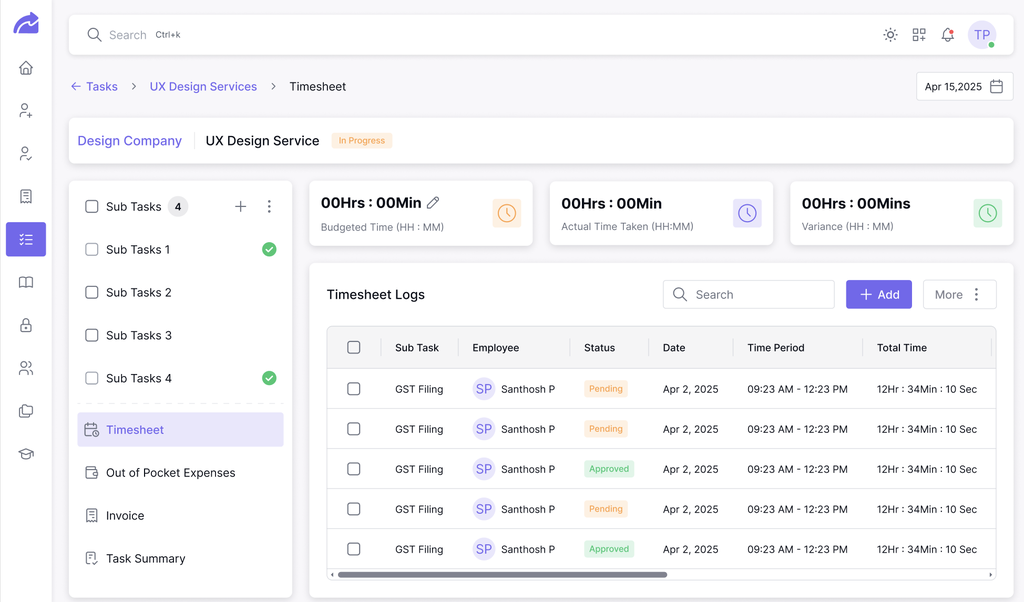
CA firms are manpower-intensive businesses. The largest component of delivering most professional services is the time spent by people. Yet many firms still record that time manually, at the end of the day, at the end of the week, or sometimes only when an invoice needs to be prepared. That makes timesheet data difficult to rely on.
Turia approaches timesheets differently: capture time as the work happens, connect it to the task and client, and use that data to understand the economics of the work.
Why Timesheets Matter More in a CA Firm
A CA firm may charge a client a fixed fee for a service, but the firm's actual cost isn't the invoice value. The real cost includes the people involved in delivering that service and the amount of time they spend doing it.
Consider a simple example: a firm charges a client ₹20,000 for a service. The work involves partner time, manager time, senior associate time and junior associate time. If the team spends significantly more time than expected, the ₹20,000 fee doesn't tell the whole story. The engagement may look profitable from the invoice, but the unit economics of the work could tell a different story. That's where timesheet data becomes important.
The Problem With Manual Timesheets
Work happens
Employee remembers the work
Hours entered later
Partner reviews
Excel / spreadsheet
Monthly reporting
By the time the hours are entered, details can be forgotten. And when time isn't captured consistently, the firm loses visibility into:
How long a task actually takes
How much manpower went into a client
Which employees spent time on the engagement
Which tasks consume the most resources
Whether a fixed-fee engagement is profitable
Whether the original estimate was realistic
The problem isn't simply that employees forget to fill timesheets. The bigger problem is that time isn't connected closely enough to the work being performed.
Automating Timesheets at the Point of Work
With Turia, a user can start a timer directly from their work.
Open Task
Start Timer
Work on Task
Stop Timer
Time Logged Against Task
The time is associated with the relevant user and task, creating a record of how much time was actually spent doing the work. This gives partners a live view of what the team is working on.
Partners Can See What the Team Is Working On
A partner doesn't have to wait for a weekly timesheet report to understand where the team is spending time. They can see who is working on what, right now.
Priya
GST filing for ABC Industries
Rahul
Statutory Audit for XYZ Pvt Ltd
Arun
TDS compliance for Client ABC
This turns the timesheet from a retrospective record into a live operational signal.
What If Someone Forgot to Start the Timer?
Real work doesn't always happen perfectly. Someone might finish a task and realize they forgot to start their timer. Turia allows the user to add the timesheet after the work is completed, and the time is still logged against the relevant task and user. The firm can maintain a complete time record without forcing every employee to restart the workflow simply because a timer wasn't started at the beginning.
Making Timesheets Harder to Forget
Turia provides custom settings that can help firms enforce timesheet discipline. For example, a firm can configure a rule around minimum timesheet hours: if the required minimum hasn't been recorded, the system can lock punch-out until the required timesheet information is completed. The objective isn't to make timesheets bureaucratic, it's to make sure that if the team worked, the firm's system captures the work.
From Timesheets to Manpower Cost and Task Profitability
A timesheet tells you how much time was spent. Combined with manpower cost, a firm can start asking what that work actually cost.
Example
Manpower Cost
Task: GST compliance for Client A
Time spent: 8 hours
Team members: Associate + Manager
Manpower cost: Calculated from the firm's cost data
Now the firm has a cost associated with the task, a much more useful picture than simply knowing that 8 hours were spent.
The Formula
Task Profitability
Revenue − Manpower Cost = Profitability
Instead of asking only "did we complete the task?", a partner can eventually ask "was this task profitable?" That's a very different way of looking at practice management.
From Task Profitability to Client Profitability
Tasks don't exist independently, they belong to clients. A client may have GST work, TDS work, Income Tax work, audit, ROC work, advisory and other recurring services. If each task captures the time and manpower cost involved, the firm can begin aggregating those economics at the client level. That allows a partner to ask:
Which clients consume the most team time?
Which clients generate the most revenue?
Which clients are actually profitable?
Which services are consuming more resources than expected?
This is where timesheets become practice intelligence rather than just attendance records.
The Unit Economics of a CA Firm
For professional services businesses, people are the primary delivery resource. You aren't selling inventory, you're selling professional expertise and the time of your team.
Employee
Time
Task
Manpower Cost
Client
Revenue
Profitability
This is the real value of good timesheet data.
How Taxcube Approaches Practice Operations
Taxcube is a professional practice that uses Turia to manage its workflows. Instead of treating timesheets as a standalone HR or attendance function, the firm uses time data in the context of the work being performed, and that distinction matters.
A timesheet that simply says "8 hours, Employee A" doesn't tell a partner very much. A timesheet connected to Client, Service, Task, Employee and Time creates much more useful information.
What This Enables
Where team time is being spent
Which tasks consume significant manpower
How much effort different services require
How client work compares with the revenue it generates
Which engagements deserve closer review
The result is a shift from tracking time to understanding the economics of time.
100s of CA firms use Turia Practice every day












Timesheet Automation vs Traditional Timesheets
| Traditional Timesheet | Turia |
|---|---|
| Enter hours later | Start timer while working |
| Time can be recorded from memory | Time linked to actual task |
| Limited live visibility | Partners can see active work |
| Manual timesheet discipline | Configurable enforcement |
| Time viewed independently | Time connected to client and task |
| Mainly used for attendance/reporting | Can support cost and profitability analysis |
| Data often sits in spreadsheets | Data lives with the practice workflow |
What CA Firms Can Learn From Their Timesheet Data
Once a firm consistently captures time, the data can answer questions that are otherwise difficult to answer.
Which tasks take longer than expected?
Identify work that repeatedly exceeds estimates.
Which services consume the most manpower?
Compare time spent across different types of engagements.
Which clients require disproportionate effort?
Compare client revenue against the manpower involved in serving them.
Where is the team spending its time?
Understand how capacity is distributed across clients and services.
Which engagements should be reviewed?
Identify work where the relationship between revenue and delivery cost needs attention.
Timesheets Are Not Just About Employee Productivity
Timesheet management is often positioned as tracking whether employees are working. That's only one small part of the value. For a CA firm, the more important question can be: what does it cost us to deliver our services? And then: are we charging appropriately for the work? And finally: which clients and services are actually profitable?
That's where timesheet data becomes a business management tool.
How Turia Connects the Workflow
The value comes from connecting multiple parts of the practice. This is why timesheets shouldn't live in a separate spreadsheet.
Client
Service
Task
Timesheet
Manpower Cost
Invoice
Revenue
Profitability
The time belongs to the work. The work belongs to the client. And the client contributes to the economics of the practice.
Where This Connects
Timesheets are one part of understanding your practice. Explore how this fits with the rest of Turia's CA practice management software.
Task Management
Where timers start, and where time gets linked to real work.
Learn moreBilling & Practice Analytics
Revenue per client and per employee, from your own data.
Learn moreWork Planning & Team Coordination
See workload and capacity across the team.
Learn morePricing
See current plans, all of which include timesheets.
Learn moreRelated Feature
Logged time doesn't have to sit in a spreadsheet until month-end. See how billable hours flow into Turia's invoicing and billing feature, from proforma to final invoice.
Real Case Study
See how T S Ajai Chartered Accountants, a Hyderabad CA firm, combined Timesheets with the dashboard and Reports to move from reactive firefighting to data-backed decisions.
A Timesheet Can Tell You Where the Hours Went. A Connected Timesheet Can Tell You Where the Money Went.
For CA firms, the real value of timesheet management isn't simply recording employee hours. It's connecting time to task, to cost, to client, to revenue and to profitability. When that information is captured consistently, partners can move beyond "how many hours did the team work?" and start asking what it costs to deliver a service, whether engagements are priced correctly, and which clients and services contribute to the profitability of the practice.
That's the difference between timesheet tracking and practice intelligence.
Frequently Asked Questions
What is timesheet automation for CA firms?
Timesheet automation helps CA firms capture employee time against actual client work with less manual effort. It can include timers, task-linked time entries, automated controls and reporting.
Can employees start a timer on a task in Turia?
Yes. Users can start a timer while working on a task, allowing the time spent to be recorded against that work.
Can a timesheet be added after work is completed?
Yes. If a user didn't start a timer, time can be added after the work is completed and logged against the relevant task.
Can partners see what their team is working on?
Yes. Live task activity can give partners visibility into which team members are working on which tasks.
Can Turia enforce timesheet completion?
Turia provides custom settings that can be configured to enforce minimum timesheet requirements, including controls around punching out when the required hours have not been recorded.
Can timesheets calculate manpower cost?
Timesheet data can be used with manpower cost information to calculate the cost associated with the work performed.
Can a CA firm calculate task profitability?
Yes. When task revenue and manpower cost are connected, firms can use the resulting data to understand profitability at the task level.
Can timesheets help calculate client profitability?
Yes. Aggregating task-level time and cost data across a client's work can help firms understand the relationship between client revenue and the manpower cost of serving that client.
Why are timesheets important for CA firms?
CA firms are manpower-intensive businesses. Timesheets help firms understand how much time their people spend on different clients, services and tasks, creating better visibility into workload, cost and profitability.
Want to See What Your Firm's Time Is Really Costing?
Try Turia with your real clients and tasks.
Further Reading
10 Problems CA Practice Management Software Solves
Unbilled hours and poor time visibility are core profitability issues for CA firms.
ICAI on Practice Management Software
ICAI's guidance on time recording standards and practice quality for CA firms.
Turia vs CA Cloud: Feature Comparison
Compare timesheet management, billing integration and time tracking features.