A field guide for CA firms

Why Turia Is the Most Suitable Practice Management Software for CA Firms

Running a Chartered Accountancy firm involves much more than filing GST returns and preparing financial statements. CA firms manage hundreds or thousands of clients. They collect documents, track deadlines and answer tax notices. They also coordinate staff, chase payments and make sure every assignment is finished on time.

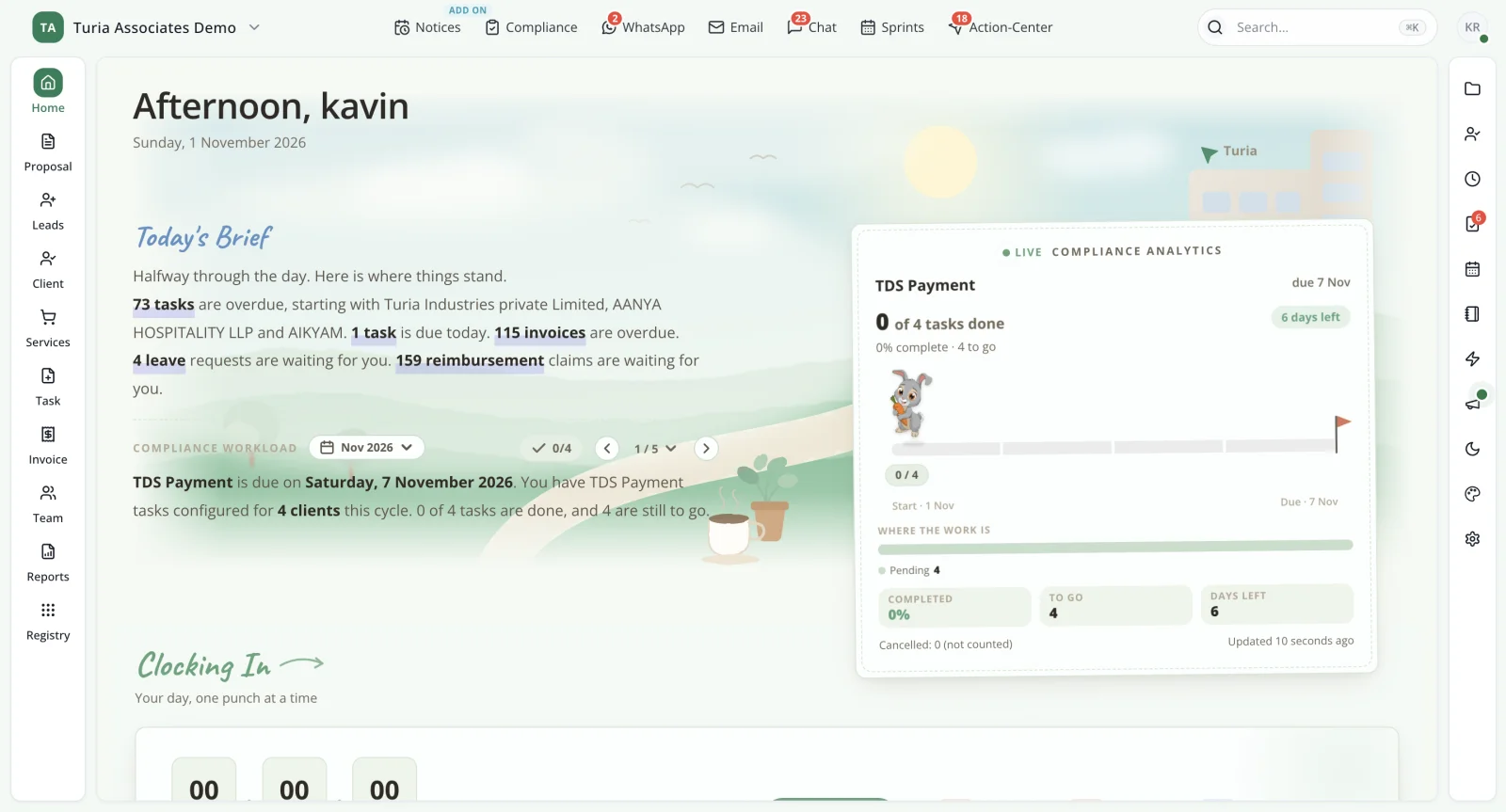
Turia CA practice management software home dashboard showing overdue tasks, invoices, leave requests and live TDS compliance analytics
This is where a partner's day starts → Turia's home dashboard: the day's brief on overdue tasks, invoices and approvals, alongside live compliance progress for the next deadline.

The short version

Turia is CA practice management and automation software for Chartered Accountant firms. It runs their clients, documents, compliance, notices, team, billing and daily operations from one platform.

It covers clients, tasks, and GST and Income Tax compliance. It also handles WhatsApp and email, documents, notices, attendance, timesheets, invoicing and workflow automation. As a firm grows, managing these activities through Excel sheets, WhatsApp conversations, emails and disconnected software becomes increasingly difficult. For CA firms looking to replace fragmented tools with a connected practice management system, Turia is a solution worth considering.

Chapter 1 · The way it usually goes

Why Do CA Firms Need Practice Management Software?

A typical CA firm may manage anywhere from 100 to several thousand clients, each requiring different services and recurring compliance activities.

The firm must ensure that every client's work is assigned, completed and reviewed within the required timelines. However, many CA firms still face the challenges below.

These problems become more significant as the firm acquires more clients.

Consider a firm with…

  • 5–10 employees, including partners and article assistants
  • 250–500 GST-registered clients
  • Monthly GST returns and TDS filings
  • Quarterly and annual Income Tax and statutory assignments
  • Hundreds of documents received through WhatsApp and email
  • Multiple client follow-ups every day
  • Government notices requiring timely responses
  • Invoices, payment reminders and outstanding fee collections

Client management

Client information, PAN, GSTIN, contact details, documents and service history are maintained across multiple spreadsheets and folders.

Document collection

Employees spend hours asking clients for pending documents through WhatsApp, email and phone calls.

Compliance tracking

Partners and managers manually check whether GST, TDS and Income Tax assignments have been completed.

Notice management

Government notices need to be checked across multiple portals, assigned to employees and tracked until resolution.

Staff management

Partners struggle to understand which employee is working on which assignment and how much work remains pending.

Billing and collections

Invoices and outstanding payments require repeated follow-ups.

Lack of visibility

Partners often have to ask employees for updates instead of viewing the firm's complete operational status in one dashboard.

The solution is not necessarily to hire more employees. It is to establish a structured practice management system that connects clients, work, documents, compliance and employees.

If these signs sound familiar, our guide on why every CA firm needs practice management software covers the tipping point in more detail.

Chapter 2 · What good looks like

What Should the Best CA Practice Management Software Offer?

Before selecting CA practice management software, a firm should evaluate whether it can manage the complete lifecycle of its operations. An effective system should provide the following capabilities:

Client management
Centralised client master with PAN, GSTIN, contact information and service history
Client portal
Separate client login for document upload, download and communication
Document management
Digital document inward and outward register with client-wise storage
WhatsApp integration
Connect WhatsApp communication with client records and work management
Compliance management
GST, TDS, Income Tax and other recurring compliance tracking
Task automation
Automatic generation, assignment and tracking of recurring tasks
Filing status
Visibility into filing status and confirmation of completed assignments
Notice management
Detection, assignment, response tracking and resolution of tax notices
Demand management
Tracking tax demands, payments, rectifications and appeals
Email integration
Gmail and Outlook integration with client-wise communication
Employee management
Attendance, leave, timesheets and task allocation
Productivity reporting
Employee-wise and client-wise workload and performance reports
DSC management
DSC register, expiry tracking and renewal alerts
Billing
Invoicing, receipts, outstanding payments and reminders
Multi-office access
Cloud-based access for partners and employees across branches

A firm should also check how much of this is genuinely automated and what needs employee action. Ask whether extra integrations or charges are involved. To see how different platforms score against this checklist, read our top 10 practice management software for CA firms in India.

Chapter 3 · A day at the firm, with Turia

How Turia Helps CA Firms Manage Their Entire Practice

Turia brings together the major operational functions of a CA firm in one connected practice management platform. Instead of using separate tools for client management, task allocation, compliance tracking, document management and billing, firms can manage these activities through Turia.

Here is how its modules address common CA firm requirements, told through one ordinary working day.

  1. 9:00 am

    A new client signs on.

    3.1Centralised Client Management

    Every CA firm needs a reliable client database. Turia provides a centralised Client Master where firms can maintain:

    • Client name and contact information
    • PAN, GSTIN and entity details
    • Client-specific information
    • Services provided to each client
    • Documents and correspondence
    • Client-related tasks and assignments
    • DSC and licence information
    • Client credentials through a password management facility

    Employees can access the information relevant to their assignments without searching through multiple spreadsheets and folders. Client credentials are held in Turia's password manager rather than shared sheets. This makes Turia useful for firms managing hundreds or thousands of clients.

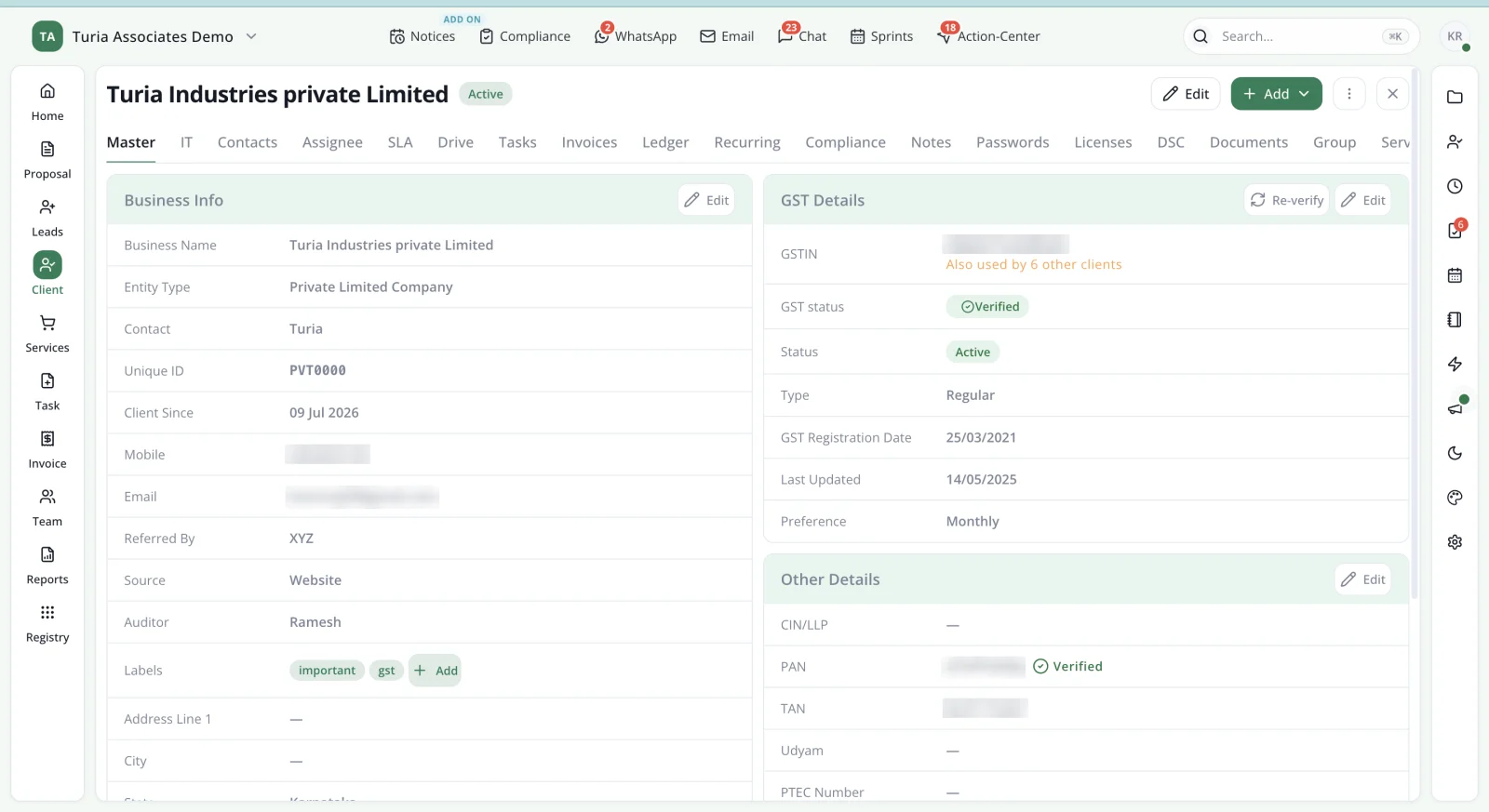
    Turia Client Master showing business info, entity type, client since date, labels, GST details with verified GSTIN and PAN, TAN and other registrations
    One client record holds business info, GST details, PAN and TAN, with tabs for tasks, invoices, compliance, passwords, licences and DSC. Contact and tax identifiers are blurred.
  2. 9:30 am

    The client logs in to share last month's bills.

    3.2Dedicated Client Portal

    Clients frequently need to share documents, download completed filings and communicate with their CA firm. Turia provides a Client Portal that gives clients a separate digital interface to interact with the firm. Through the portal, firms can facilitate:

    • Client document uploads
    • Sharing of completed documents
    • Client-wise document access
    • Digital communication
    • A more organised document exchange process

    A dedicated client portal reduces dependency on scattered email attachments and individual WhatsApp conversations. It also gives CA firms a more structured digital experience for their clients. Compare what to look for in CA software with a client portal.

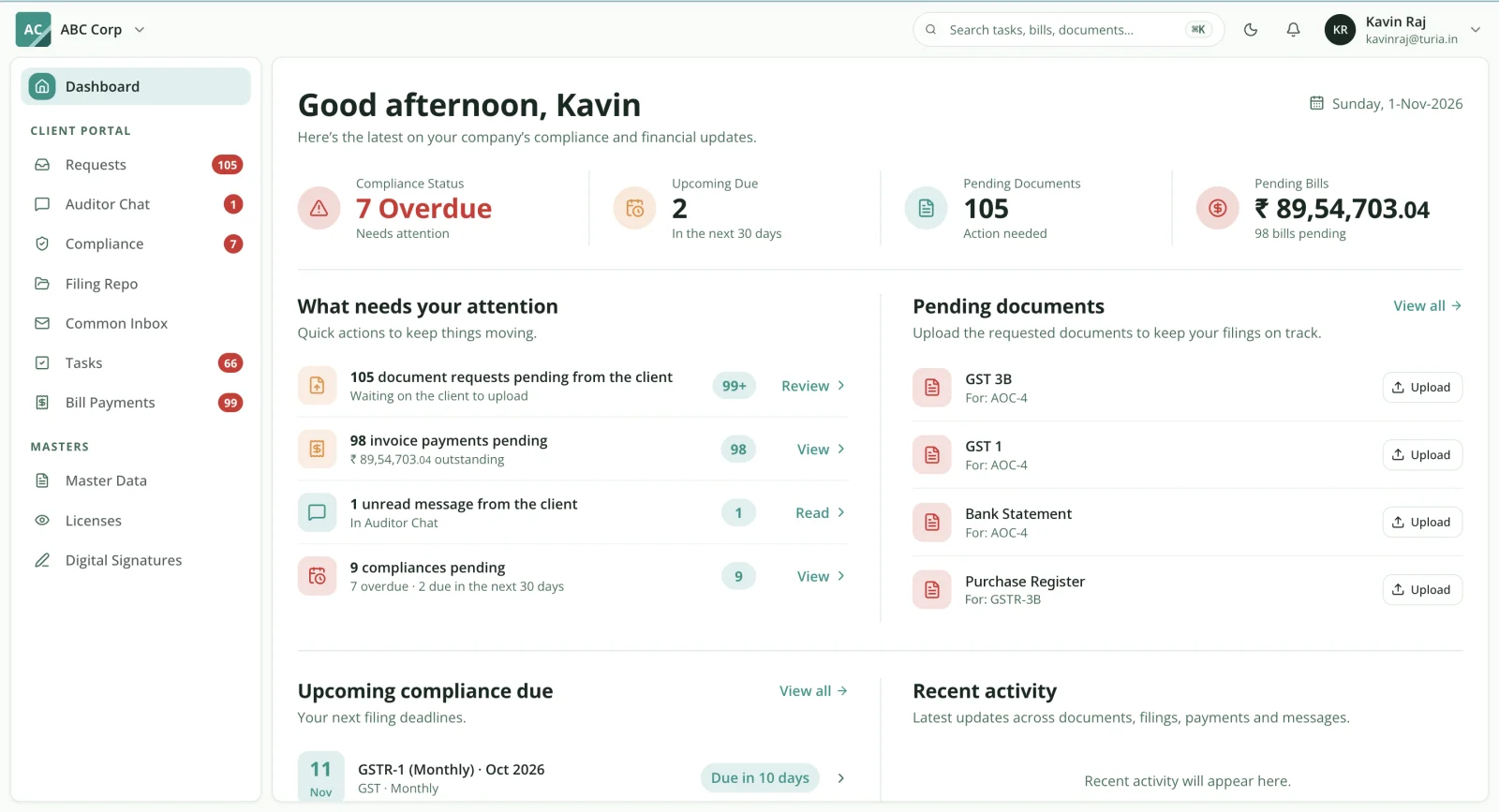
    Turia Client Portal dashboard from the client's side showing compliance status, upcoming due dates, pending document requests with upload buttons and pending bills
    What the client sees: overdue compliance, upcoming due dates, documents the firm has requested, pending bills and a chat with their auditor.
  3. 10:15 am

    A courier drops off a file of original documents.

    3.3Digital Document Inward and Outward Register

    Physical and digital documents move between CA firms and their clients every day. Without a proper register, it becomes difficult to establish which documents were received, who received them and whether they were returned. Turia includes a Document Inward and Outward facility. Firms can maintain records of:

    • Documents received from clients
    • Documents delivered to clients
    • Client-wise document movement
    • Document descriptions and related information
    • Records of document transactions

    This helps establish accountability and reduces the possibility of documents getting misplaced. See what to look for in digital inward and outward register software.

  4. 11:00 am

    A WhatsApp arrives: “Can you correct our GST invoice?”

    3.4WhatsApp and Email Integration

    WhatsApp is one of the primary communication channels between Indian CA firms and their clients. However, important work requests and documents can easily get buried in individual conversations. Turia integrates WhatsApp Business and email with practice workflows. Its communication capabilities include:

    • WhatsApp Business integration
    • Client communication
    • WhatsApp reminders
    • Converting WhatsApp messages into tracked tasks
    • Email integration with Gmail and Outlook
    • Converting relevant emails into tasks
    • Automated email and WhatsApp reminders

    Say a client messages asking for a GST correction. That message can become a task, assigned to an employee. This helps ensure that important client requests become accountable work rather than remaining buried in chat histories. See how it works on the WhatsApp automation and email automation pages. Email integration connects with Gmail and Microsoft Outlook accounts.

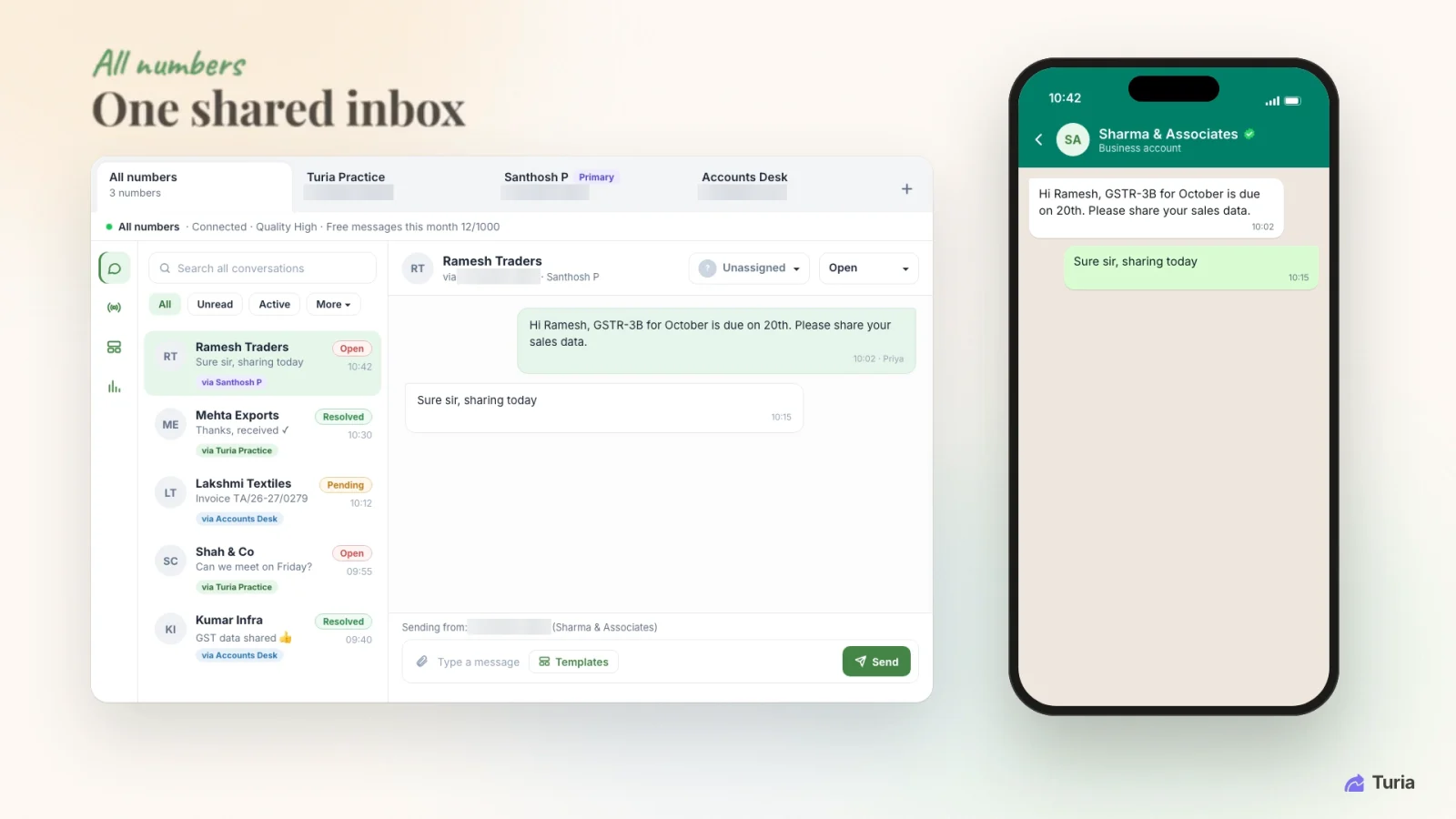
    Turia WhatsApp shared inbox showing chats across the firm's WhatsApp numbers, each with an open status and an assignee selector
    One WhatsApp inbox across all the firm's numbers, with each chat's status and assignee. Phone numbers are masked.
  5. 11:45 am

    Month-end GST work is due across 500 clients.

    3.5GST, TDS and Income Tax Compliance Management

    Compliance management is one of the most important functions of a CA practice. A firm managing 500 GST clients may have hundreds of recurring assignments every month. Turia's compliance management software helps organise compliance work through:

    • Client-wise compliance tracking
    • Recurring task generation
    • GST compliance assignments
    • TDS compliance assignments
    • Income Tax assignments
    • MCA and ROC-related work management
    • Due-date tracking
    • Task allocation and reminders
    • Employee-wise completion tracking

    For example, a firm can create recurring GST return assignments for its clients. These assignments can regenerate according to the configured schedule, with deadlines and employee ownership. Partners can monitor pending and completed work instead of depending entirely on manual follow-ups. Learn more about recurring task automation for CA firms.

    Important: Recurring task generation and task management should not be confused with automatic filing on government portals. Returns are still filed on the GST portal, the Income Tax e-filing portal and the MCA portal. Turia syncs filing status from the portals into its compliance tracker, marking each return Filed or Missed. One sync every 30 days is free; more frequent syncs use Sync Credits. Whether a task then closes on its own depends on the integration and workflow you configure.

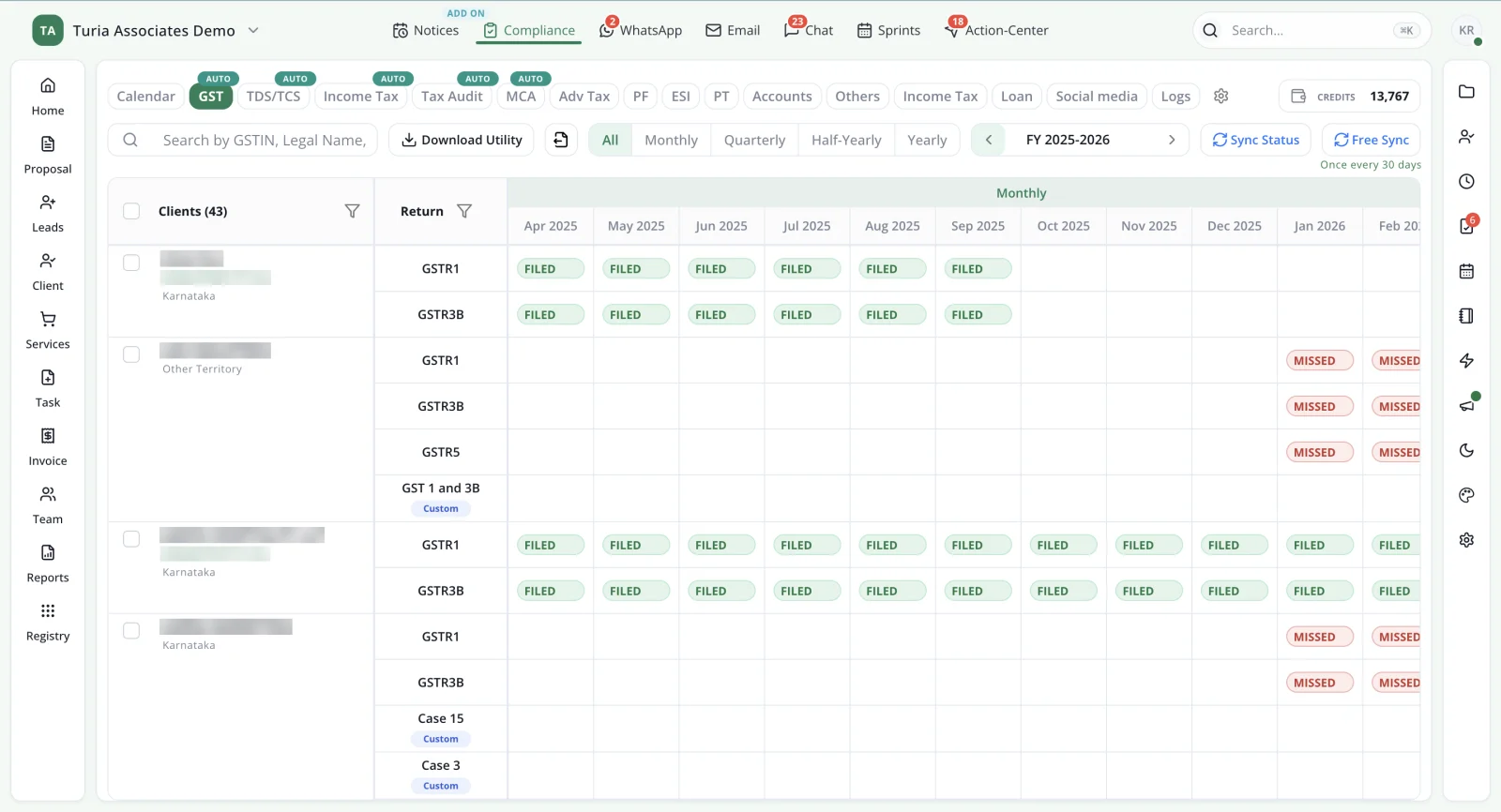
    Turia GST compliance tracker showing each client's GSTR-1, GSTR-3B and GSTR-5 returns month by month, marked Filed or Missed after portal sync
    The GST tracker: each client's returns month by month, marked Filed or Missed from the portal sync. Client names and GSTINs are masked.
  6. 12:30 pm

    A new notice appears on the GST portal.

    3.6Automatic Government Notice Management

    Government notices are time-sensitive and require proper ownership and follow-up. CA firms may receive notices through different government portals, including the GST Portal, the Income Tax Portal and TRACES. Turia offers a separate Notice Management add-on that automatically fetches supported GST, TDS and Income Tax notices. The notice management workflow helps firms:

    1. Monitor supported government portals.
    2. Identify newly available notices.
    3. Associate notices with the relevant client.
    4. Assign the notice to an employee.
    5. Track the response deadline.
    6. Monitor the response and follow-up process.
    7. Track the notice through resolution.

    This gives partners a centralised view of notices requiring attention. Instead of relying entirely on employees to manually check multiple portals, firms can use a structured notice monitoring and task management workflow. Our guide to notice management for CA firms walks through the full response process.

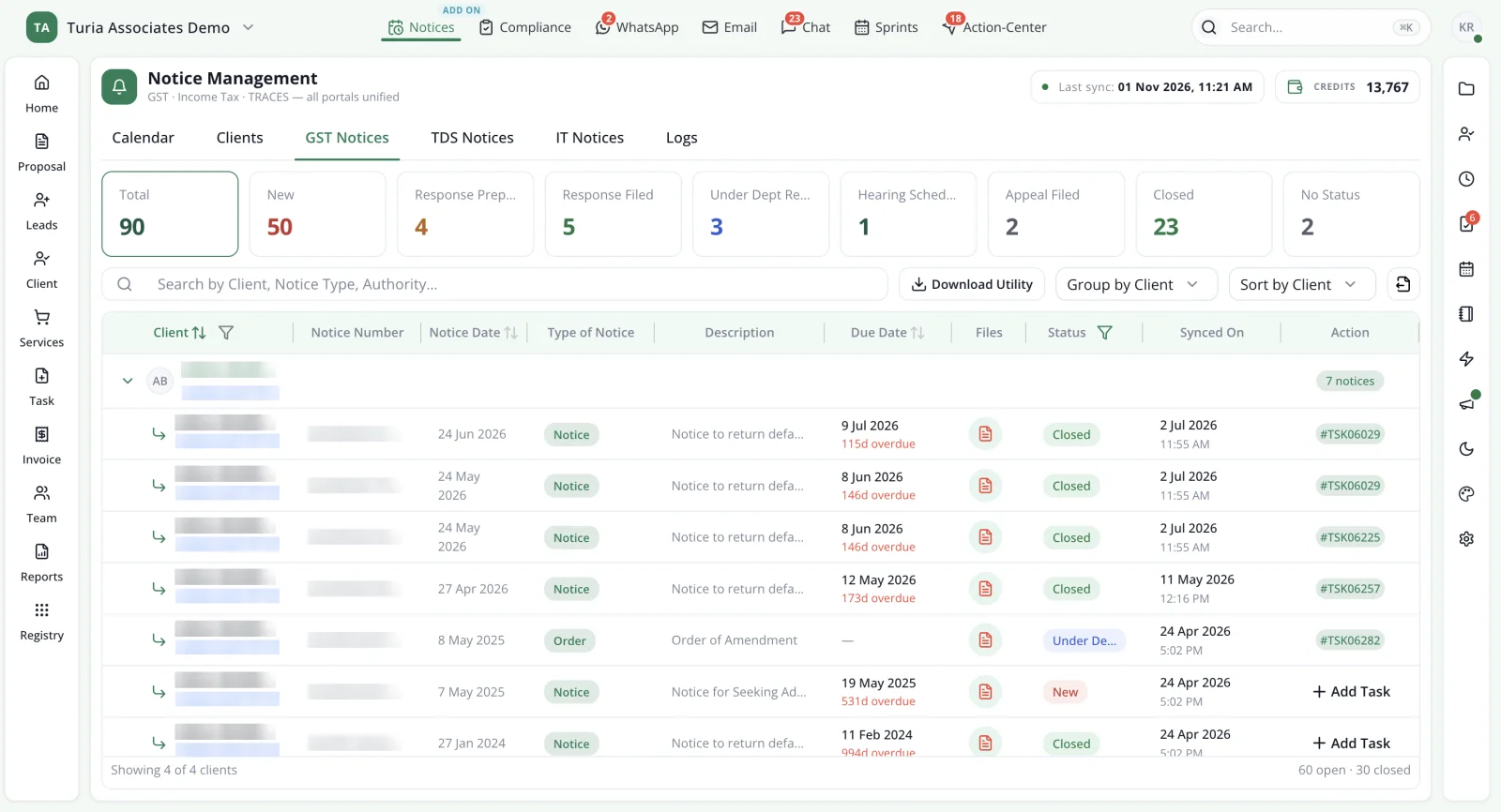
    Turia Notice Management showing GST notices fetched from the portal, counts by status from new to closed, and a client-wise list with notice date, type, due date, status and linked task
    GST, TDS and Income Tax notices fetched from the portals, grouped by client, with status, due date and the linked task. Client names, GSTINs and notice numbers are masked.
  7. 2:00 pm

    An Income Tax demand needs a decision.

    3.7Tax Demand and Resolution Tracking

    Income Tax, GST and TDS demands require careful tracking. A demand may require payment, rectification, a response, an appeal or further follow-up. A CA firm needs to maintain visibility into:

    • Client-wise demand records
    • Demand amounts and relevant periods
    • Payment status
    • Rectification requirements
    • Appeal-related assignments
    • Follow-up deadlines
    • Final resolution status

    Turia provides the wider client, task and practice management framework in which such work can be assigned and tracked.

    The exact availability of automated demand detection and portal-based demand status synchronisation should be verified for the specific government portal and workflow before implementation.

  8. 3:00 pm

    The partner checks who is working on what.

    3.8Staff Attendance, Timesheets and Task Allocation

    Partners need visibility into employee workload and productivity. Turia provides team management capabilities, including:

    • Employee attendance
    • Leave management
    • Timesheet tracking
    • Task assignment
    • Recurring assignments
    • Task status monitoring
    • Team workload visibility
    • Practice reporting

    Employees can be assigned client-specific tasks with clear responsibilities and deadlines. Partners and managers can monitor how work is distributed and identify pending assignments. Timesheets show how much time employees spend on each client and assignment. Attendance and leave management keeps availability visible when planning work.

    I like the convenience of being able to see tasks that are due, instead of having to ask each person what their task is.

    — Vinay, Chartered Accountants
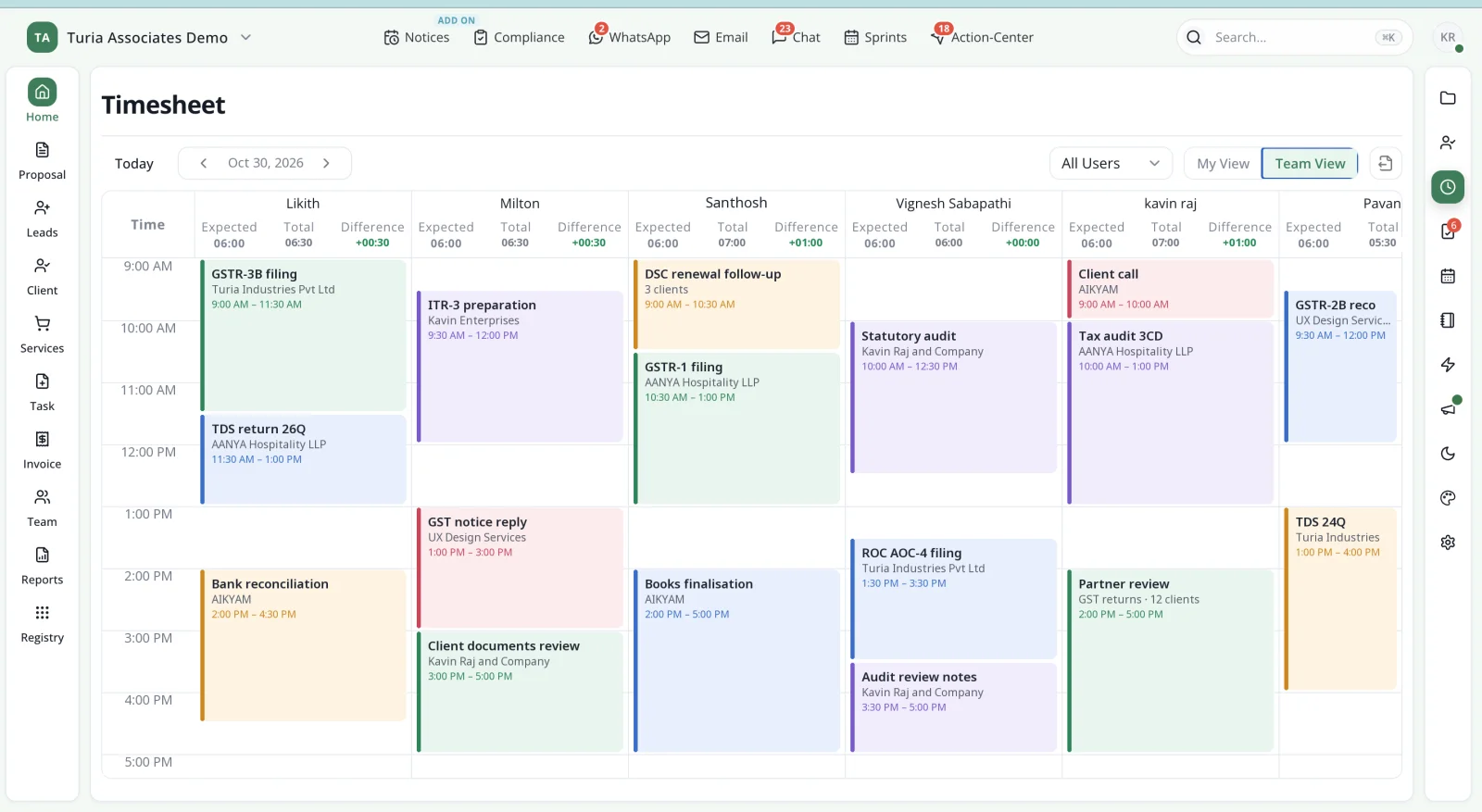
    Turia timesheet team view in calendar format showing each employee's time blocks for client work such as GSTR-3B filing, TDS returns and audits, with expected, total and difference hours
    Timesheet team view: each person's day logged against clients and assignments, with expected versus actual hours.
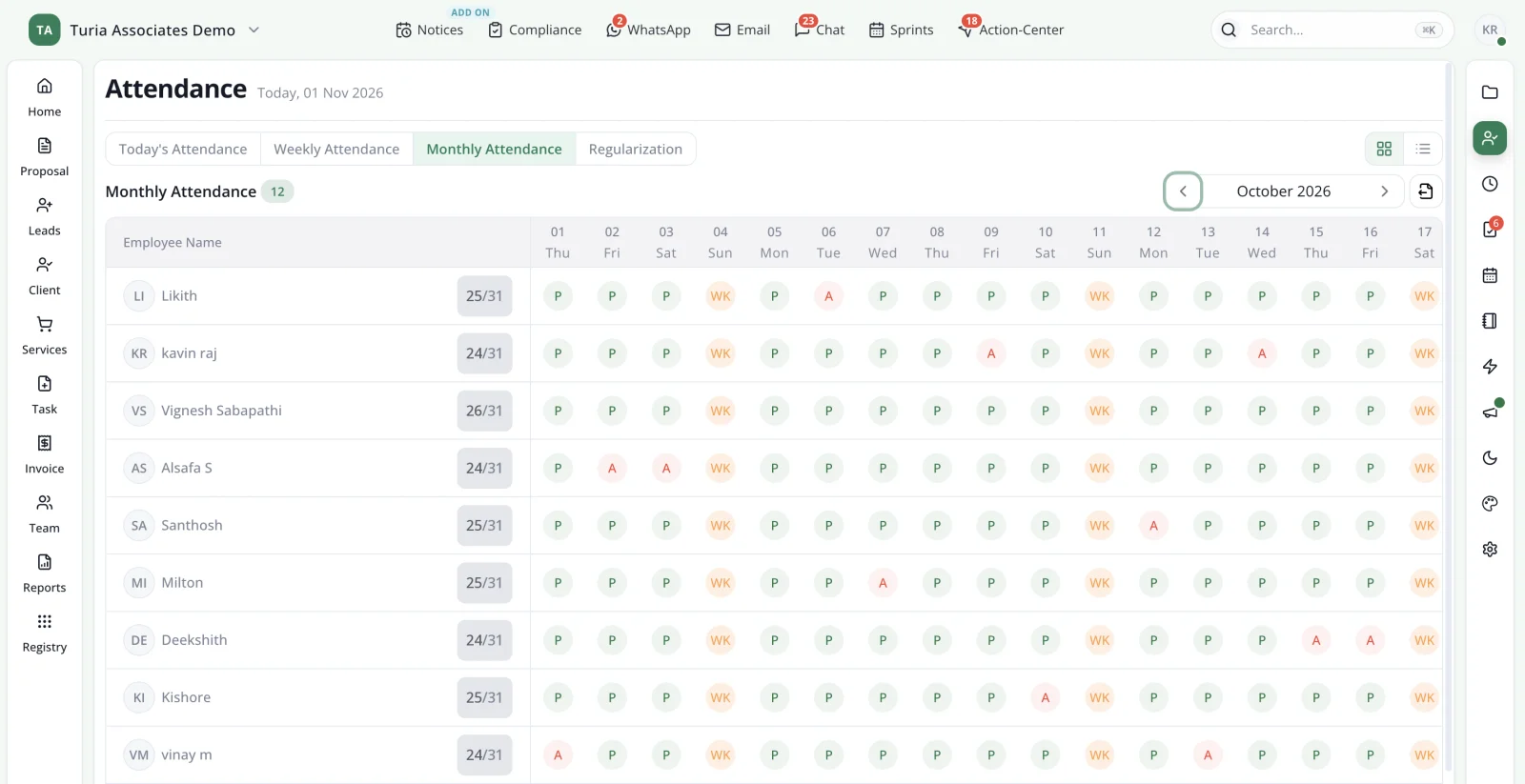
    Turia monthly attendance view listing each employee with present, absent and weekly-off markers for every day of the month and a days-present count
    Monthly attendance: every employee's present, absent and weekly-off days at a glance.
  9. 4:15 pm

    A client's DSC is about to lapse.

    3.9DSC Register and Expiry Management

    Digital Signature Certificates are essential for several statutory filings, and are issued by Certifying Authorities licensed by the Controller of Certifying Authorities. Turia includes a DSC Register to help firms maintain DSC-related information and track expiry dates. This helps employees and partners maintain better visibility into:

    • Client-wise DSC records
    • DSC custodians
    • Expiry information
    • Renewal requirements

    The firm can organise renewal follow-ups before certificates expire, and Turia's DSC expiry agents can handle the reminders.

    Many times, when I am about to file a form, after inserting the token we realize that the DSC is expired. After I started using Practice Management Software, I get an alert of all expired Digital Signatures. I get them renewed immediately.

    — India Startup Service, Bengaluru
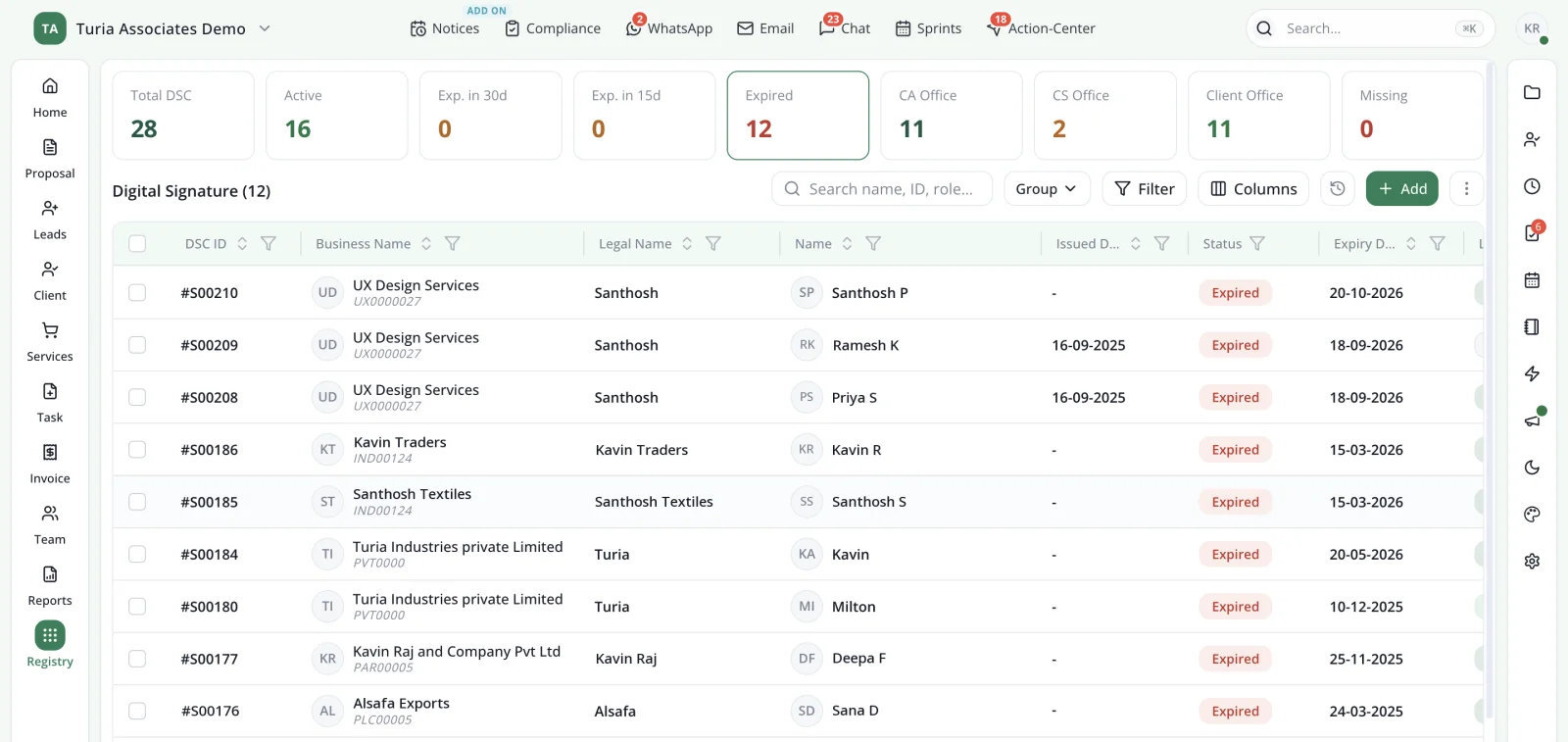
    Turia DSC Register with counts of total, active, expiring and expired certificates, custody by CA office, CS office or client, and a client-wise list with expiry dates
    The DSC Register, filtered to expired certificates, showing who holds each DSC and when it expired.
  10. 5:30 pm

    Time to bill for the month's work.

    3.10Billing, Invoicing and Payment Follow-ups

    Managing billing and collections is another important part of CA practice management. Turia provides billing and invoicing capabilities, including:

    • Proforma invoices
    • Billable time
    • Expense management
    • Final invoices
    • Payment recording
    • Outstanding payment tracking
    • Payment reminders

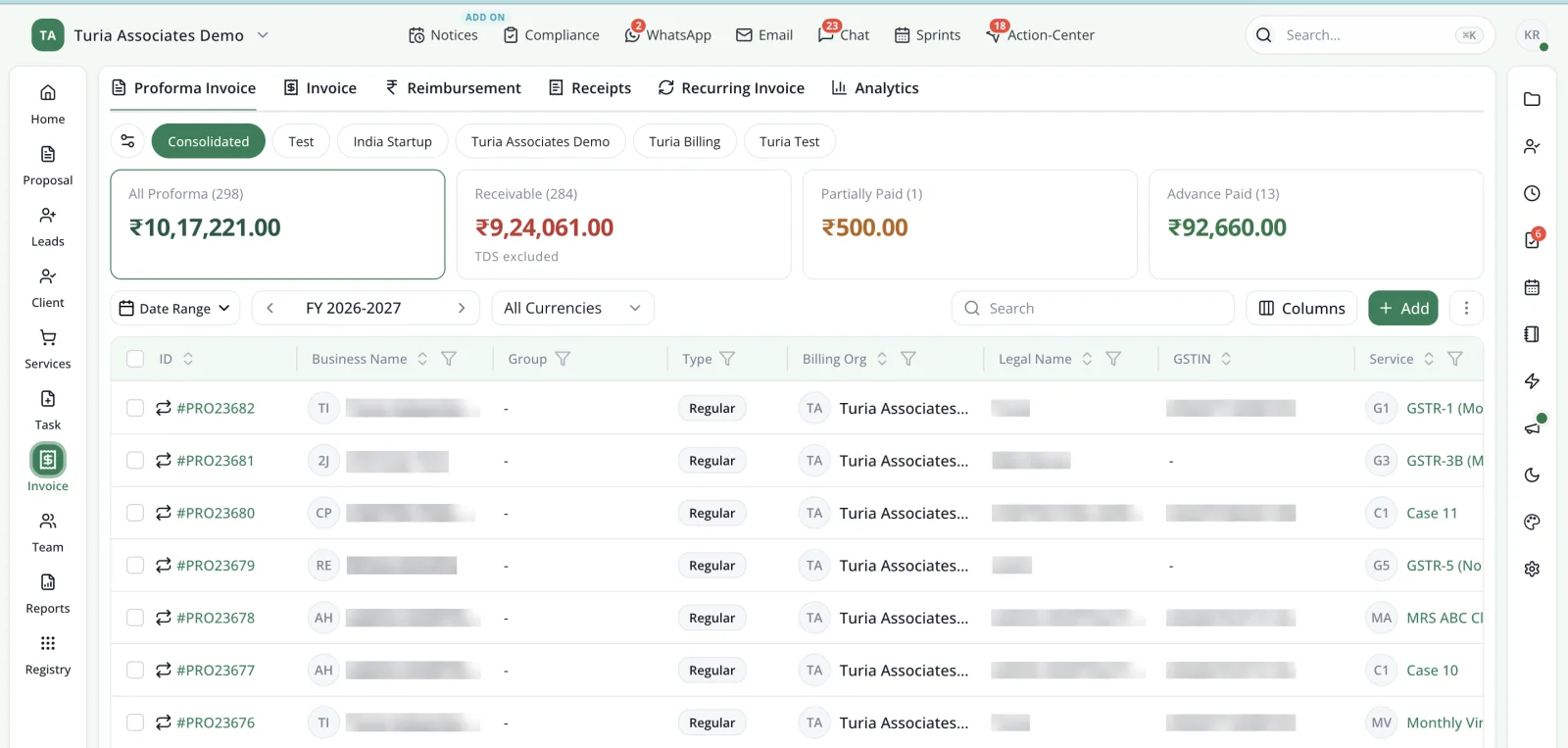
    Firms can connect the commercial side of their practice with the services and work delivered to clients. This helps partners understand outstanding collections and follow up on unpaid invoices. See how firms improve collections with automated billing.

    Turia proforma invoice list across billing organisations, with totals for all proforma invoices, receivable, partially paid and advance paid amounts
    Proforma invoices across the firm's billing organisations, with totals receivable, partly paid and paid in advance. Client names and GSTINs are masked.

Chapter 4 · What runs by itself, and what still needs you

How Much of the CA Practice Can Turia Automate?

This is an important consideration when choosing practice management software. Not every feature advertised as automation is fully automatic. The distinction between system automation, employee action and external portal integration should be clear. In short:

Runs on its own once configured: recurring compliance tasks, WhatsApp and email reminders, and payment follow-ups. Notice detection for supported portals runs through the paid add-on. Turia's AI agents also collect documents from clients and deliver finished work.

Turia tracks, your team acts: task allocation, WhatsApp and email turned into tasks, notice assignment, the document register, attendance and invoicing. Filing status syncs from the portals; whether a task then closes on its own depends on the integration.

Still needs qualified staff: statutory decisions, filing, document checks and notice replies.

For the activity-by-activity breakdown, and the hours it saves, read what CA practice automation software automates and what still needs people. Then request a demonstration of each workflow before assuming it is fully autonomous.

Chapter 5 · 500 clients, eight steps

Real-World Example: How Turia Can Help a CA Firm Managing 500 Clients

Consider a CA firm with five employees and approximately 500 GST clients. The firm has multiple monthly compliance deadlines, receives documents through WhatsApp and email, and manages notices across different government portals. Here is how Turia can structure its daily operations.

  1. 1

    Step 1: Client onboarding

    The firm creates client records in Turia, including PAN, GSTIN, contact information and applicable services.

  2. 2

    Step 2: Compliance assignment generation

    Recurring GST and TDS assignments are generated according to the firm's configured schedules.

  3. 3

    Step 3: Document collection

    The firm uses WhatsApp, email and the Client Portal to request and receive client documents.

  4. 4

    Step 4: Task allocation

    Assignments are allocated to employees with deadlines and checklists.

  5. 5

    Step 5: Notice monitoring

    The Notice Management add-on checks supported portals and identifies newly available notices.

  6. 6

    Step 6: Notice assignment

    Detected notices are associated with clients and assigned to employees for action.

  7. 7

    Step 7: Partner monitoring

    Partners monitor task status, compliance work, notices and team workload through the practice management system.

  8. 8

    Step 8: Billing and collections

    Invoices are generated and outstanding payments are tracked with reminders.

The result is a more structured operating environment in which client information, work assignments, compliance activities and billing are connected. For real firms that made this shift, see our CA firm case studies. If yours is a team of 5–10, read which software a small CA firm should use for a person-by-person setup.

Why one connected system works better than Excel, WhatsApp, Drive and a separate billing tool is a story of its own. We follow a single client through it in which software can handle all the operations of a CA firm in one place.

Chapter 6 · What it costs

How Much Does CA Practice Management Software Cost?

Pricing is an important consideration, especially for small and growing CA firms. Turia follows an annual subscription model based on the number of users rather than charging separately for every client. Its published pricing is:

Basic

₹6,999/year

Up to 5 users

Starter

₹9,999/year

Up to 10 users

Most Popular

Growth

₹16,999/year

Up to 20 users

Professional

₹24,999/year

Up to 40 users

Enterprise

₹34,999/year

Up to 60 users

Prices are exclusive of 18% GST. The published plans include the core feature set, with the plan determined by team size. Turia also offers a 7-day free trial.

Optional Notice Management add-on

Notice Management is available separately with 10,000 Sync Credits for ₹5,000, equivalent to ₹0.50 per credit. The first 100 credits are available as a free trial. The same credits cover filing-status syncs beyond the free one every 30 days. Actual credit consumption depends on the portal synchronisation activity.

Firms should confirm their expected portal usage and any additional integration or communication charges before subscribing. For the latest pricing and plan details, visit the Turia pricing page.

500+ CA firms use Turia Practice every day

P. Pattabhiramen and Co., Chartered Accountants logoPSDY & Associates, Chartered Accountants logoRNH & Co LLP logoAjith & Associates logoJoseph & Rajaram, Chartered Accountants logoIndia Startup Service (indiastartup.in) logoNRSR & Co logoGST Relief logoSKBCO, Chartered Accountants logoMRO & Associates logoMohan & Chandrasekhar, Chartered Accountants logoMohamed & Associates logo

Read what firms say on our testimonials page.

Chapter 7 · Who it's for

Who Should Consider Turia?

Turia is designed for Chartered Accountant firms and professional practices that want to organise their operations and reduce manual administrative work. It is particularly relevant for:

Small CA firms

Firms with 5–10 employees that want to manage clients, tasks, compliance and billing without maintaining multiple spreadsheets.

Growing CA firms

Firms managing hundreds of GST and Income Tax clients that need structured recurring assignments and employee accountability.

Mid-sized CA firms

Firms with multiple partners and employees that need centralised visibility into clients, tasks, compliance and collections.

Multi-branch CA firms

Firms that need cloud-based access to common practice information across different offices.

Technology-driven CA firms

Firms interested in WhatsApp integration, workflow automation, client portals and AI-powered document collection and follow-ups.

When Turia may be less suitable

Turia may be less suitable if you only want accounting or bookkeeping software. It is also not an app that files every statutory return on its own, without your staff.

Comparing Turia with a specific tool? See the CA practice management software comparisons hub or the practice management software reviews.

Chapter 8 · Questions firms ask

Frequently Asked Questions About CA Practice Management Software

Which is the best practice management software for CA firms in India?

The right software depends on the firm's size, number of clients and automation requirements. Turia is one option for CA firms looking for an integrated platform covering client management, compliance, tasks, documents, WhatsApp, notices, billing and team management.

Why do CA firms choose Turia over other practice management software?

Turia charges a flat annual fee based on team size, with unlimited clients. Every plan has the same features: WhatsApp and email, the Client Portal, DSC and licence registers, attendance, timesheets and billing. Notice Management is the main optional add-on. Firms comparing specific tools can see feature-by-feature comparisons on the Turia blog.

Which software automatically saves WhatsApp documents client-wise?

Turia brings documents sent to the firm's integrated WhatsApp numbers into one shared inbox. An employee then attaches each document to the right client's task. Turia does not automatically recognise attachments and file them into client folders.

Can Turia automatically detect GST and Income Tax notices?

Yes, through a paid Notice Management add-on. It fetches supported GST, Income Tax and TDS notices automatically, then tracks each one through assignment and resolution.

Can software automatically close tasks after GST or Income Tax filing?

Turia syncs filing status from the portals into its compliance tracker, so each client's returns show as Filed or Missed. One sync every 30 days is free, and more frequent syncs use Sync Credits. Whether the related task then closes automatically depends on how the integration and workflow are configured, so check that step in a demo.

Does Turia offer staff attendance and timesheet management?

Yes. Turia provides employee attendance, leave management, timesheet tracking, task allocation and practice reporting.

Does Turia have a DSC expiry register?

Yes. Turia includes a DSC Register to maintain client-wise DSC information and expiry tracking.

How much does Turia cost?

Turia's published annual plans start at ₹6,999 for up to five users, excluding GST. Optional Notice Management is charged separately. See the official pricing page for current plans and add-on details.

Does Turia offer AI automation for CA firms?

Turia offers AI-powered workflows and agents for repetitive activities such as document collection, client reminders and invoice follow-ups. The exact workflow capabilities and automation scope should be confirmed during a demonstration.

Evening. Everything accounted for.

Manage Your Entire CA Practice with Turia

A growing CA firm needs more than a task management application or a client database. It needs a connected system that helps partners manage clients, employees, compliance deadlines, documents, notices, billing and daily operations.

Turia brings these capabilities together in one CA practice management platform. Whether you manage 100 clients or thousands, the goal is the same. Establish accountability, improve visibility, cut repetitive follow-ups and build a more organised practice.

If you are evaluating CA practice management software in India, explore Turia and see how its workflows fit your firm's requirements.

Further reading

Request a DemoCall Us